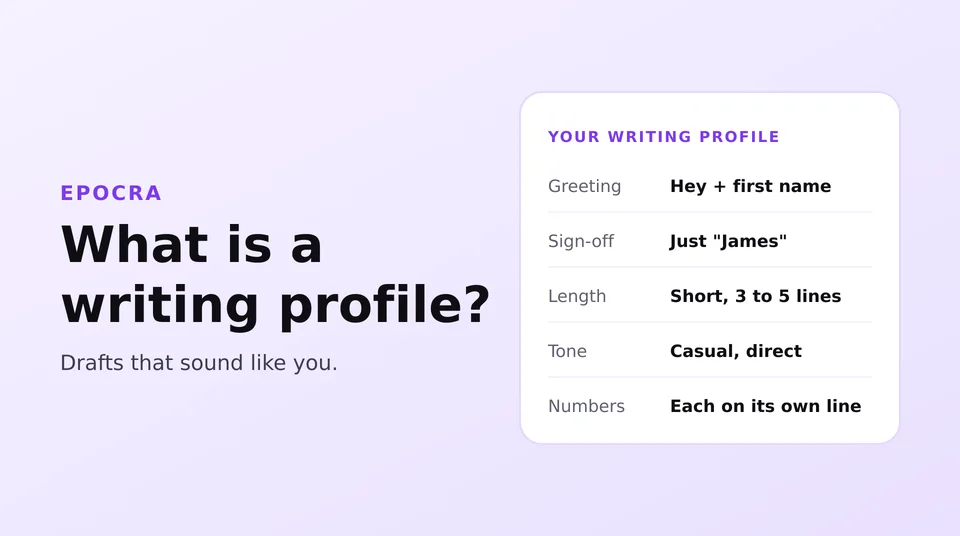
A writing profile is a short description of how you write email, built from the emails you have sent. When Epocra drafts an email for you, it follows that description, so the draft sounds like you and not like a robot. It is off until you say yes, and you can turn it off any time.
What it is
Everybody writes email a little differently. Maybe you open with “Hey Mike”, keep it to three lines and sign off with just your first name. Maybe you always put prices on their own line. That stuff is what makes an email sound like it came from you.
When you turn the writing profile on, Epocra reads the emails you sent. Only your own words count: the quoted replies underneath, your signature and any legal footer are taken out first. From that, it writes a short description of how you write:
- How you say hello, and how you sign off
- How long your emails usually are
- Your tone, and how it changes between a customer and a coworker
- How you lay out numbers, dates and lists
- Phrases you use a lot, and ones you never use
Then, when you ask Epocra to write an email, the draft follows that description. It keeps learning too. New emails you send are added each night.
What else it learns while it is on
While the profile is on, Epocra also picks up the standing facts you state, in your email and on your side of your calls. Things like your prices, your policies, how long a job takes, or which portal a customer is set up on.
That means a draft can answer with the real answer. Say a customer emails asking what a second location costs. Without the profile, the draft says “the price is [price]” and you fill it in. With it, the draft says “A second location is $25 a month”, because you have told three other customers the same thing.
What it never does
- It never sends email. A draft waits in your Drafts folder until you read it and hit send yourself.
- It never learns facts from private or personal contacts. Anyone you mark Private, or whose contact type is a personal one like family or friends, is left out of what Epocra learns about your business. Your writing style is still learned from all the email you send.
- It never saves card or account numbers. Card, account and Social Security numbers, and other long ID numbers, are filtered out of everything it learns.
- We do not train AI models on your mail. Your profile is used for your drafts and nothing else.
One honest note: to write the profile and your drafts, Epocra sends text to the AI providers it uses, and some of them may process that text under their own terms. Our Privacy Policy lists who they are and what they do.
You are in control
- It is off until you say yes. Right after you connect your email, Epocra asks you once. If you say not now, it never asks again.
- You can change your mind any time. Go to Settings, then Integrations, then Email, and use Learn from my email.
- Turning it off deletes it. The profile and everything it learned are deleted. Your email stays searchable in Epocra, and it can still write drafts for you, just in a general voice.
- You can read it and fix it. Press View / edit profile to see the whole thing in plain English. If something is off, like how you sign off, change it and your drafts follow your version.
Why we ask instead of just doing it
Your sent folder is about as personal as it gets, and I would not want an app quietly studying mine without asking. The profile makes drafts a lot better, but that should be your call, so we ask once and leave the switch with you.
Connect your email to Epocra
Your calls and your email in one place, with drafts that sound like you when you want them to.
How to connect your emailJames Ritter
Founder of Epocra. Fifteen years in payments, now building call intelligence for people who run their business from their phone.