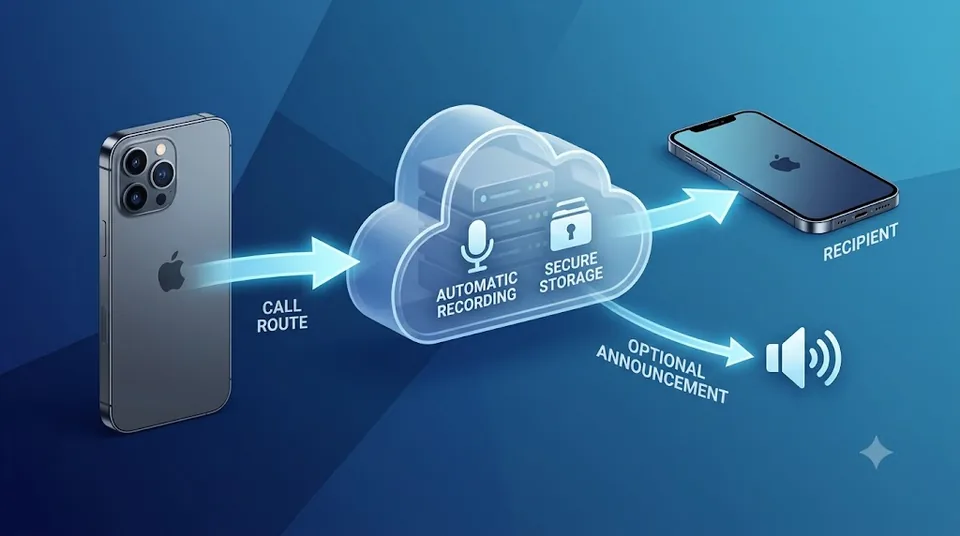
You can’t turn off Apple’s announcement. There is no iOS setting, no hidden toggle and no App Store app that can silence the notice attached to Apple’s built-in call recorder — iOS doesn’t expose call audio to apps, so nothing capturing audio from the Phone app can record quietly. Calling services record a different way: by routing the call through their own phone system rather than tapping Apple’s.
Use a calling app designed to record the entire conversation from the beginning. Epocra allows recording to begin as soon as the call connects. There is no button to press halfway through and no robotic announcement interrupting the conversation. Every call can be automatically recorded, transcribed, and summarized.
You also control whether a recording notice plays when the call begins. Leave it enabled to notify both parties, or disable it in your settings when legally permitted. Recording laws vary by jurisdiction, and some require consent from everyone on the call, so it is your responsibility to understand the rules that apply.
Try Epocra freeSee it in action
See how it works on Epocra
An interactive demo — not a video — of making a call and having it recorded and transcribed. The call ends, and seconds later the recording, transcript and AI summary are waiting — no button pressed, and no announcement mid-call when the notice setting is disabled.
- Recording starts at connect — nothing to interrupt
- Summary and action items after every call
- Filed to the contact, searchable months later
Why your iPhone announces every recording
Apple added call recording in iOS 18.1 and shipped it with the announcement built in from day one. It isn't a setting they forgot: the feature is designed around clear notice. Both sides hear that recording has started, and a visible indicator stays on screen for the duration.
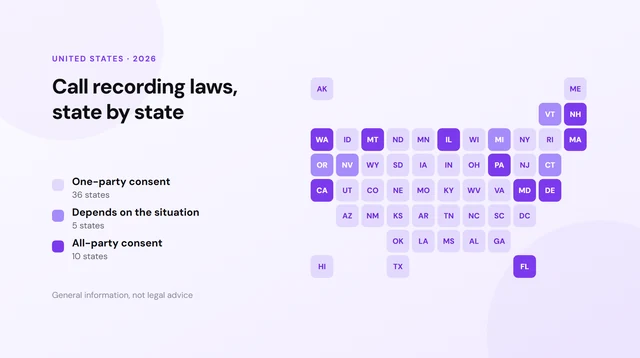
The likely reason is legal rather than technical. Most US states let a participant record a conversation with only their own consent, but a smaller group require consent from everyone involved, at least in some circumstances. A recorder that could run silently would make it easy to fall foul of those rules without realising. Building the notice in means everyone on the call is told — though notice and legal consent are not the same thing, and an announcement on its own is not a guarantee of compliance.
The "no announcement" tricks, and what they actually are
Search this and you'll find reels promising a secret iPhone setting. There isn't one. Every method that circulates is one of these three, and it's worth knowing which you're being sold:
| What's promised | What it actually is | Catch |
|---|---|---|
| "Hidden iOS setting" | Doesn't exist | No such toggle in any iOS version |
| Second device on speakerphone | Another phone or recorder in the room | Poor audio, still needs consent |
| Third-party recorder app | Usually adds a recording line via a conference call | Manual setup, extra dialling steps, inconsistent call handling |
None of them are good solutions.
What about a recording device?
There is a third option the software debate usually skips: a separate hardware recorder. Devices such as the Plaud Note attach to the back of your phone and capture the call through a contact sensor that reads vibration from the earpiece, alongside ordinary microphones. Because they never touch iOS, Apple’s announcement never plays.
That genuinely works, and it has two real advantages over any calling service: you keep using your existing number, with no second line and nothing to change about how you dial — and the same device records in-person conversations, which no phone service can do.
The trade-offs are worth knowing before spending $159 to $179 plus a subscription:
- You have to start it, every time. The recorder does not know a call is happening. You press the button before or during the conversation. Miss it and the call is gone — and you find out afterwards. For someone taking a handful of calls a day that is a minor habit; for someone on the phone all day it is a reliable source of missed recordings.
- AirPods and headsets break it. The device needs either vibration from the phone’s earpiece or audible sound in the room. Take the call on AirPods, a wired headset, or a car system and there is nothing for it to capture. Speakerphone is fine — it picks that up as ordinary sound.
- Your phone case matters. These devices attach magnetically and rely on contact with the phone body. A thick or rugged case weakens both the attachment and the vibration path it depends on.
- The two sides of the call are not captured equally. Your voice reaches the device directly through the air. The other person’s voice arrives as a phone-compressed signal played through a small earpiece speaker and picked up again through vibration or air. Transcription quality tends to reflect that difference, particularly on names, numbers and anything said quickly.
- It records the call, not your business. There is no call history, no contact record and no link between a recording and who you were speaking to. That lives in whatever app you sync the device to afterwards.
A recorder makes sense if you take most calls holding the phone to your ear or on speaker, want to keep your existing number, and also want to capture in-person conversations.
A calling service makes sense if you would rather not think about it: every call on your business line recorded automatically, whether you took it on speaker, on AirPods or in the car, with no button to press and nothing extra to carry or charge.
What Actually Works: Epocra
Here's the thing most people are really after. Read the threads and the complaint is almost never "I want to record someone secretly" — it's that the announcement lands in the middle of the conversation. You're already talking, you realise the call matters, you tap record, and a robot interrupts everyone. It's jarring, and it changes the tone of the call.
That problem has a clean fix, and it isn't a workaround. Two things change. First, recording begins the moment the call connects, so there is nothing left to interrupt. Second — and this is the part Apple's recorder will never do — the announcement is a setting you own, and you can switch it off entirely. Where the law allows it, you turn it off and no announcement plays at any point in the call.
Leave it switched on instead and it plays as part of the greeting, the same way it works every time you ring a company and hear "this call may be recorded" before anyone picks up — disclosure up front, before the conversation starts, rather than a robot cutting into it halfway through. Either way, the mid-call interruption is gone.
- No mid-call interruption — recording is already running before you say hello.
- Nothing to remember — the calls you most wish you'd recorded are the ones you didn't know would matter.
- The announcement can be turned off — it's an account setting, not something the phone forces on you. Switch it off entirely where the law allows, or leave it on to disclose up front. The rules that apply to your calls are still yours to check.
That's how Epocra works. Calls route through your Epocra number, so recording starts at connect rather than when you remember to press something — and because it happens on the line rather than on the handset, iOS's restrictions never enter into it. That's also why the announcement is optional here and mandatory on Apple's: it's your line, not Apple's feature, so the disclosure is your call to make. You get the recording, a transcript and a summary, with no robot cutting into your conversation.
Recording the built-in way (announcement and all)
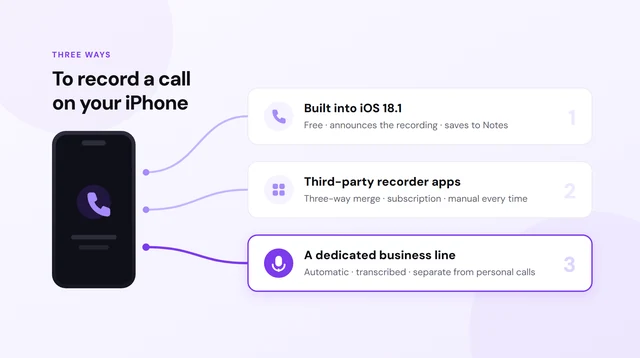
If you're fine with the notice playing, Apple's own feature is free and works well. Here's the sequence:
- Start or answer a call as normal.
- Tap the Record button in the top-left corner of the call screen.
- Wait for the announcement. Everyone on the call hears that recording has begun — including you. There's a short pause before capture starts.
- Talk. A recording indicator stays visible for the whole call.
- Tap again to stop, or just end the call. It saves automatically.
The announcement isn't optional and can't be disabled. Apple made that choice deliberately so the feature can't be used covertly. It provides clear disclosure, though it does not by itself guarantee compliance in every jurisdiction or circumstance.
Where the recording goes
Recordings land in the Notes app, in a folder called Call Recordings — not Voice Memos, and not the Phone app. Each becomes a note containing the audio and, on supported iPhones, a searchable transcript. Recordings are saved on the device in Notes; how they are protected in iCloud depends on your Notes and Advanced Data Protection settings.
Which iPhones support it
| iPhone | Recording | Automatic transcript |
|---|---|---|
| iPhone 16 series | Yes | Yes |
| iPhone 15 Pro / Pro Max | Yes | Yes |
| iPhone 15 / 14 / 13 / 12 / 11 | Yes | No |
| iPhone XR, XS, SE (2nd/3rd gen) | Yes | No |
Recording needs iOS 18 on an iPhone XR or later. The transcript and AI summary need Apple Intelligence — the iPhone 15 Pro models and the iPhone 16 line.
Call recording hasn't shipped in the EU or Spain, because of how GDPR treats recording the other party's voice. If your iPhone region is European, you won't see the Record button.
What the built-in feature doesn't do
For a one-off call — an interview, a quote, instructions you want to keep — Apple's version is genuinely all you need, and you should just use it. It stops being enough when recording calls is a routine part of your work rather than an occasional thing.
You have to remember, every single time
The Record button is manual. The calls you most wish you'd recorded are the ones where you didn't know in advance that the conversation mattered — the quick check-in where a client moves the date, or a number gets quoted in passing.
Notes is not a call history
Each recording is a separate note. Nothing links it to the contact it came from, nothing lets you ask what a client agreed to three months ago, and nothing surfaces the commitments you made across a week of calls. You can search inside a transcript you can already find — a different problem from remembering which call it was in.
- Use Apple's for the occasional call you know matters in advance.
- Use something else when every client call needs to be findable months later.
| iPhone built-in | Epocra | |
|---|---|---|
| Cost | Free | From $9.99/mo |
| Starts recording | You tap, every call | Automatic |
| Transcript | Apple Intelligence iPhones only | Every call |
| Organised by contact | No — loose notes | Yes |
| Search across all calls | No | Yes |
| Summary & action items | Per-call summary | Every call, emailed |
| Works on older iPhones | Recording only | iPhone and Android |
When every call needs to be on the record
Epocra records, transcribes and summarises automatically, then emails you the follow-ups after the call.
Is it legal to record a call on your iPhone?
Usually, yes — in most US states a participant may record a conversation they are part of. A smaller group require consent from everyone involved, at least in some circumstances, and the detail varies: statutes carve out exceptions, courts have read them differently, and the answer can turn on whether the call is private, electronic, or crosses state lines. Because Apple's announcement plays to everyone on the line, the built-in feature makes disclosure straightforward — but disclosure is not the same as compliance, and it does not cover every jurisdiction or situation.
For calls that cross state lines the safest approach is to follow the stricter applicable consent rule; which jurisdiction's law actually controls can depend on the circumstances. This is general information, not legal advice — check the rules that apply to you before making recording a habit.
Frequently asked questions
It's a two-part answer. On the iPhone's own recorder, you can't — there's no iOS setting and no app that can suppress the announcement, because iOS doesn't expose call audio to apps. On Epocra, you can. Calls route through your Epocra number instead of Apple's recorder, so recording starts the moment the call connects, and whether a notice plays is an account setting you can switch off where the law allows.
No. No version of iOS has ever included one, and the "secret trick" videos are showing a second device on speakerphone, a conference-bridge app, or a non-US region.
It's a two-part answer. On Apple's built-in recorder, no — its announcement is mandatory and there's no way to turn it off. On Epocra, the notice is an account setting, so it can be switched off. Whether you may switch it off is a legal question rather than a technical one: most US states let a participant record with only their own consent, while a smaller group require consent from everyone on the call, at least in some circumstances. Check the rules that apply to you before disabling any notice.
Three usual reasons: you're not on iOS 18 or later, your iPhone is older than the XR, or your device region is in the EU where the feature hasn't shipped.
To the Notes app, in a Call Recordings folder — not Voice Memos. Epocra keeps them in your account instead, so every recording, transcript and summary is available 24/7 from any device. The app also syncs your transcripts and summaries onto the phone and keeps recently played recordings there, so your call history stays searchable even with no signal.
Yes. Unlike speakerphone workarounds, it captures both sides properly.
James Ritter
Founder of Epocra. Fifteen years in payments, now building call intelligence for people who run their business from their phone.
Sources: Apple Support — Record and transcribe a call · MacRumors · Tom's Guide. Device support and regional availability verified July 2026.
Keep reading