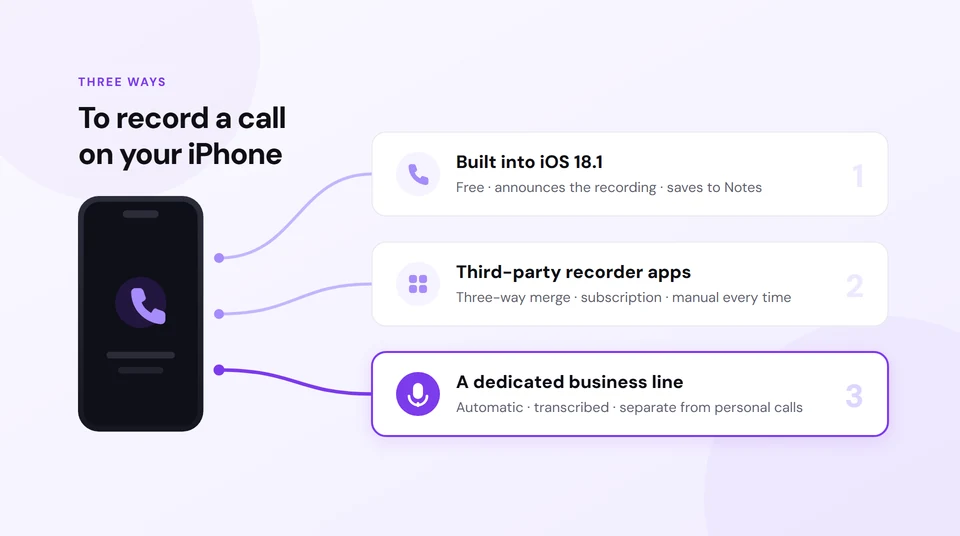
Your iPhone has recorded calls on its own since iOS 18.1. Turn it on once in Settings › Apps › Phone › Call Recording, then during any call tap More and choose Call Recording. The file and its transcript land in the Notes app when you hang up. Both people on the call hear an automated announcement the moment it starts, and there is no setting anywhere in iOS that turns that off.
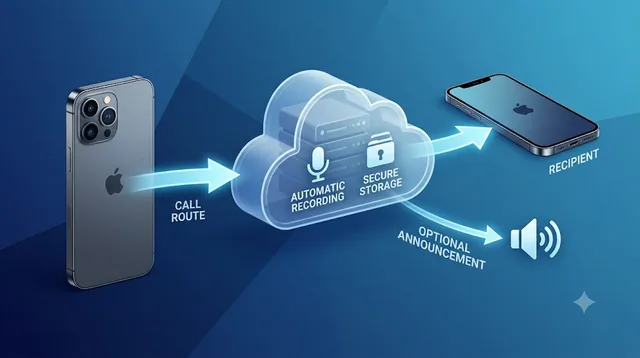
If the call actually matters, don't rely on remembering to press a button. Epocra records from the moment the call connects — nothing to tap halfway through, nothing to forget, and no interruption to the conversation.
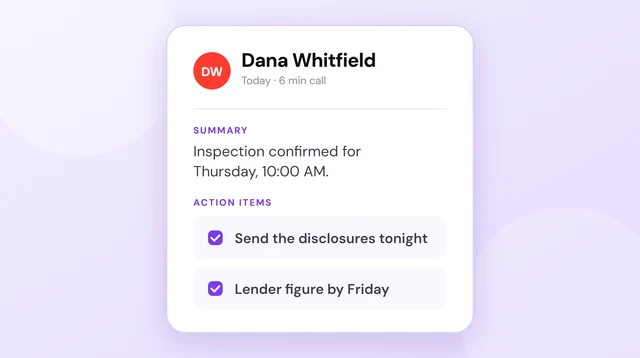
Then it does the work you would never get round to yourself. Every call comes back transcribed with each speaker labelled, summarised in a few lines, and with the follow-ups pulled out as action items — all filed against the contact. Ask a question weeks later, what did we agree on price?, and the answer comes back drawn from the transcripts, citing the call it came from. Searchable across every conversation you ever had.
The recording notice is yours to control, too: leave it playing at the start of every call, or switch it off in settings — it is not welded into the operating system the way Apple's is. Recording laws vary by jurisdiction and some require consent from everyone on the call, so it remains your responsibility to know the rules that apply to you.
Try Epocra freeSee it in action
See how it works on Epocra
An interactive demo — not a video — of making a call and having it recorded and transcribed. The call ends, and seconds later the recording, transcript and AI summary are waiting — no button pressed, and no announcement mid-call when the notice setting is disabled.
- Recording starts at connect — nothing to interrupt
- Summary and action items after every call
- Filed to the contact, searchable months later
How to record a phone call on iPhone
For most of the iPhone's life the answer to this was "you can't, not properly". That changed in October 2024 with iOS 18.1, which put a recorder directly into the Phone app. iOS 26 has since built on it with transcripts, summaries and Live Translation. It is a genuine, first-party feature — it is simply a manual one.
The control is off until you enable it, and it lives somewhere most people never look:
- Turn the feature on. Open Settings, go to Apps › Phone, tap Call Recording and switch it on. You only do this once.
- Place or answer the call exactly as you normally would.
- Wait until the call connects. The control does not appear while it is still ringing.
- Tap More (⋯) in the call controls to open the extra options.
- Tap Call Recording. A three-second countdown plays before anything is captured.
- Both parties hear the announcement. An automated voice says the call will be recorded, and a recording indicator stays visible on screen for the rest of the call.
- Stop when you're done — tap the control again, or simply end the call. The recording saves by itself.
The same control appears on FaceTime audio calls. It does not appear on FaceTime video calls, or on calls running through WhatsApp, Messenger, Signal or any other third-party app — iOS keeps their audio out of reach.
Where iPhone call recordings are saved
Not Voice Memos. This is the single most common place people get stuck: they record a call successfully, go looking for it in the obvious app, and conclude the recording failed.
Recordings go to the Notes app, in a folder called Call Recordings. Each call becomes a note containing the audio, and — on supported hardware — the transcript underneath it.
Because the recording is a note, deleting the note deletes the recording. There is no second copy anywhere else, and nothing links it back to the contact you spoke to.
Getting a transcript and a summary
Open the recording in Notes and tap Show Transcript and Summary. After a few moments you get the conversation broken up by speaker, and on Apple Intelligence hardware a short generated summary above it.
Two conditions have to be met. The language has to be one Apple supports for call transcription, and the iPhone has to be new enough to run Apple Intelligence. Plenty of iPhones can record a call but cannot transcribe one — the recorder and the transcriber have different hardware requirements, which is not obvious until you go looking for a transcript that never appears.
Which iPhones support call recording
| Capability | What you need |
|---|---|
| Recording a call | iPhone XR or later, running iOS 18.1 or newer |
| Transcript and summary | An Apple Intelligence iPhone (15 Pro and later), in a supported language |
| Regional availability | Not available in the EU, or in a number of other countries |
If the Call Recording option simply isn't there, it is almost always one of those three: the iPhone is too old, iOS is out of date, or the device region is one where Apple has not shipped the feature. The EU exclusion catches a lot of people who assume it's a bug.
The announcement, and why Apple won't let you turn it off
Apple built the notice in on day one and has never shipped a way to disable it. It is not an oversight — the feature is designed around audible disclosure, which sidesteps a great deal of legal risk in the places where recording requires everyone's agreement.
This is the part people most want a way around, and there is a lot of bad advice about it online. The short version: no hidden iOS setting exists, and nothing from the App Store can silence it, because iOS never hands call audio to third-party apps in the first place.
We wrote a separate piece on this one specifically — the tricks that circulate, what each of them actually is, and the one approach that records without interrupting the conversation: iPhone call recording without the announcement.
The other ways to record a call on iPhone
If the built-in recorder doesn't fit, these are the remaining options. All of them trade something away:
| Method | What it actually is | The catch |
|---|---|---|
| Google Voice | Recording on calls made to your Google Voice number | Incoming calls only, announces to both sides, needs everyone to use the GV number |
| Third-party recorder apps | A conference call with a recording line added | Extra dialling every single time, per-minute charges, patchy call handling |
| Second device on speakerphone | Another phone recording the room | Poor audio, room noise, the far side comes through badly |
| Dedicated hardware recorder | An inline or lightning recorder | Cost, carrying it, and it's still a manual step |
| A calling app that records by default | Calls route through a phone system that records them | Nothing to remember mid-call |
What the built-in feature doesn't do
You have to remember, every single time
This is the real limitation, and it has nothing to do with audio quality. The calls you most wish you had recorded are the ones you did not expect to matter — the quick confirmation that turns into a dispute three months later, the number rattled off while you were driving. By the time a call has revealed itself as important, it is over.
Notes is not a call history
A folder of audio files is not a record of your calls. There is no view of who you spoke to and when, nothing tying a recording to a contact, and no way to search across everything you have ever discussed with one person. You get files, in the order you happened to make them.
It stops at the recording
A recording is raw material. What you usually need afterwards is the two lines that mattered: the price agreed, the date promised, the thing you said you would send. Finding those means listening to the call again, or reading a transcript that is only there if your iPhone is new enough.
What Actually Works: Epocra
Epocra approaches it from the other end. Instead of capturing audio out of the Phone app — which iOS will not allow anyway — calls run through your Epocra number, and the recording happens on the network rather than on the handset.
The practical difference is that recording is the default state rather than a decision you make under pressure:
- Recording starts the moment the call connects — there is no button, so there is nothing to forget
- Every call is transcribed, regardless of how old your iPhone is
- A summary and the follow-ups arrive by email once the call ends
- Everything is filed against the contact, so a client's whole history is one search away
- It works the same on any device — iPhone, Android, desktop
Whether a notice plays at the start is a setting on your account rather than something the operating system decides for you. Leave it on to announce every call, or turn it off where the law permits.
Is it legal to record a call on your iPhone?
Usually, yes — in most US states a participant may record a conversation they are part of. A smaller group require consent from everyone involved, at least in some circumstances, and the detail varies: statutes carve out exceptions, courts have read them differently, and the answer can turn on whether the call is private, electronic, or crosses state lines. Because Apple's announcement plays to everyone on the line, the built-in feature makes disclosure straightforward — but disclosure is not the same as compliance, and it does not cover every jurisdiction or situation.
For calls that cross state lines the safest approach is to follow the stricter applicable consent rule; which jurisdiction's law actually controls can depend on the circumstances. This is general information, not legal advice — check the rules that apply to you before making recording a habit.
Frequently asked questions
Yes, since iOS 18.1. Enable it in Settings › Apps › Phone › Call Recording, then tap More during a connected call and choose Call Recording. It is off by default, which is why many people assume it doesn't exist.
To the Notes app, in a Call Recordings folder — not Voice Memos, which is where most people look first. Deleting the note deletes the recording.
Three usual reasons: your iPhone is older than the XR, you are not on iOS 18.1 or later, or your device region is one where Apple has not shipped the feature — including the entire EU.
Not with Apple's recorder — the announcement is mandatory and cannot be disabled. On Epocra the notice is an account setting, so it can be switched off. Whether you may switch it off is a legal question rather than a technical one, and it depends where you and the other party are. There's more detail in our piece on the announcement.
On supported hardware, yes — open the recording in Notes and tap Show Transcript and Summary. It needs an Apple Intelligence iPhone (15 Pro or later) and a supported language, so a phone that records perfectly well may still never produce a transcript.
FaceTime audio calls work with the built-in recorder. FaceTime video, WhatsApp, Messenger and Signal do not — iOS does not expose their audio to the recorder or to any other app.
Yes. Unlike speakerphone workarounds, the built-in recorder captures both sides properly, and so does Epocra.
More in the Help Center: What gets recorded.
James Ritter
Founder of Epocra. Fifteen years in payments, now building call intelligence for people who run their business from their phone.
Sources: Apple Support — Record and transcribe a call · MacRumors · Engadget. Device support and regional availability verified August 2026.
Keep reading