If you have ever wondered why an AI assistant gave you a brilliant answer one minute and a confidently wrong one the next, the explanation is usually one word: context.
Context is the single idea that explains most of what AI tools like ChatGPT, Claude and Gemini can and can’t do. Why it “forgets” what you said an hour ago. Why pasting in a document makes its answers sharper. Why a long, rambling chat slowly gets worse. Why the same question gets different answers in different apps.
Once you understand context, these tools stop feeling like magic or mystery. They start feeling like what they are: very capable readers that can only work with what is in front of them. This post explains what that means, from the ground up.
Context is everything the model can see at the moment it writes its response. Every word of your message, every earlier message in the conversation, any file you attached, and any instructions the app gave it behind the scenes. All of it is laid out as one long block of text, and the model reads that block from top to bottom before it writes a single word back.
Anything outside that block does not exist to the model. It can’t see your screen, your inbox, last week’s chat, or the thing you meant but didn’t say. If it isn’t in the context, the model is guessing.
A useful way to picture it: imagine hiring a brilliant consultant who has read most of the world’s books but has never met you. Every time you ask a question, they walk into a room, read the folder on the table, answer, and leave. The folder is the context. The quality of their answer depends enormously on what you put in that folder.
Tokens: how context is measured
Models don’t read letters or whole words. They read tokens, which are chunks of text, usually a short word or a piece of a longer one.
For example, “cat” is typically one token. “Unbelievable” might be split into three, like “un”, “believ” and “able”. Spaces, punctuation and numbers get tokens too. A rough rule of thumb for English:
| Text | Approximate tokens |
|---|---|
| 1 word | about 1.3 tokens |
| 1 page of a typical document (~500 words) | about 650 tokens |
| A 10-minute phone call, transcribed (~1,500 words) | about 2,000 tokens |
| A 300-page novel (~90,000 words) | about 120,000 tokens |
These numbers vary by model and by language; code, tables and non-English text usually take more tokens per word. You don’t need to count them precisely. What matters is that tokens are the currency of context. Everything the model sees costs tokens, and every model has a limit on how many it can hold at once.
The context window: the size of the desk
The context window is the maximum number of tokens a model can hold at once. It includes both what goes in (your messages, files, instructions) and what comes out (the model’s reply).
Think of it as a desk. The model’s training is like a giant library it absorbed years ago: broad general knowledge, but fixed, and fuzzy on details. The context window is the desk in front of it right now. Only what is on the desk can be read word for word, cross-referenced and quoted accurately.
Desks have gotten much bigger. When ChatGPT launched in late 2022, its window held roughly 4,000 tokens, a few pages. Many of today’s leading models hold hundreds of thousands of tokens, and some go past a million. That’s the difference between a sticky note and several novels.
But a bigger desk doesn’t mean the model reads everything on it equally well. More on that below.
What actually goes into the context
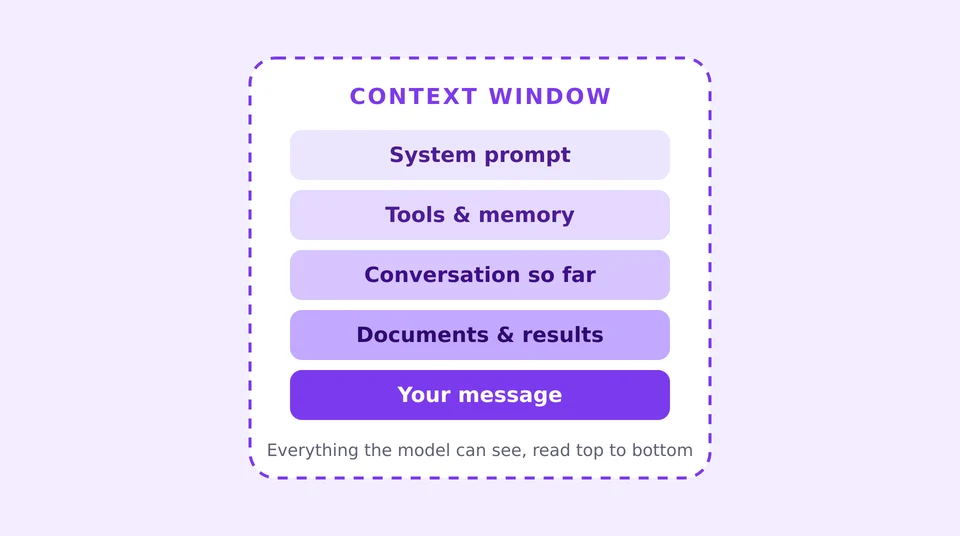
When you type a question into a chat app, you might assume the model sees just your question. In reality, the app quietly assembles a much larger package and sends the whole thing every time.
- The system prompt. Instructions written by the company that built the app, which you usually never see. This is why the same model can act like a customer-service agent in one product and a coding assistant in another.
- Tools and memory. If the assistant can search the web, run code or remember your preferences, descriptions of those abilities and any saved notes are written into the context as text.
- The conversation so far. Every message you and the model have exchanged in this chat. The app re-sends the whole history with each new message.
- Documents and tool results. A PDF you uploaded, the text of a web page it searched, a call transcript. When an AI “looks something up”, the result is pasted into its context.
- Your newest message. The thing you actually just asked.
- The reply. The model’s answer is generated into the same window, so a long answer uses up space too.
From the model’s point of view, there is no difference between “instructions”, “memory” and “documents”. It is all just text in one long scroll. The app’s job is to fill that scroll wisely.
Context is not memory
This is the part that surprises most people: the model itself remembers nothing between messages.
Every time you hit send, the model starts completely fresh. It has no recollection of your last message. The only reason a chat feels continuous is that the app re-sends the entire conversation, from the very first message, each time. The model re-reads the whole thing and responds as if it had been there all along. That explains a few common experiences:
- A new chat knows nothing about your old chat. Different conversation, different context.
- “Memory” features are really context features. When an assistant remembers that you run a small business or prefer short answers, the app has saved a note and slipped it into the context of new chats. Useful, but it is still just text on the desk.
- Correcting it in one chat doesn’t teach it permanently. Your correction lives in that conversation’s context. The underlying model is not changed by talking to it.
It helps to separate two kinds of knowledge:
| Training | Context | |
|---|---|---|
| What it is | Patterns learned from huge amounts of text, before release | The text in front of the model right now |
| When it’s set | Months before you use it, with a knowledge cutoff date | Fresh with every message |
| How precise | Broad but fuzzy; can misremember details | Exact; can quote it word for word |
| Who controls it | The AI company | You and the app you’re using |
When you need the model to be accurate about something specific (your pricing, your contract, what a client said on Tuesday), don’t rely on training. Put it in the context.
Why bigger isn’t always better
If context is so important, why not just dump everything into it? Because how much a model can hold and how well it uses what it holds are different things.
Attention gets spread thin. A model decides what matters by weighing every token against every other token. The more text on the desk, the more competing signals. A key sentence buried in 200 pages is easier to overlook than the same sentence in two.
The middle gets lost. Researchers have found that many models are best at using information near the very beginning or very end of the context, and noticeably worse at using facts buried in the middle. A 2023 study on this effect was aptly titled “Lost in the Middle”.
Quality drifts as context grows. Long, winding conversations accumulate abandoned ideas, outdated instructions and contradictions. The model has to reconcile all of it. People in the industry call the gradual decline “context rot”. If a chat has gone off the rails, starting a fresh one with a clean summary often works better than arguing with it.
More context costs more and runs slower. The model re-reads the entire context for every reply. Twice the text means more computing work, a longer wait and, for businesses paying by the token, a bigger bill.
The goal isn’t the most context. It’s the right context: as little as needed and as much as necessary.
What happens when the window fills up
Even a huge desk eventually runs out of room. Long chats, big file uploads and AI agents that work for hours all hit the limit sooner or later. Apps handle this in a few ways:
- Dropping the oldest messages. The simplest approach: the beginning of the conversation quietly falls off the desk. This is why an assistant can “forget” an instruction you gave at the start of a very long chat.
- Summarizing (sometimes called compaction). The app asks the model to write a condensed summary of the conversation so far, then replaces the full history with that summary. You keep the gist and lose the fine detail.
- Refusing or warning. Some apps simply tell you the conversation is too long and ask you to start a new one.
None of these are bad. They’re trade-offs. But knowing they happen explains a lot of “why did it suddenly forget that?” moments. If something matters, restate it, or put it somewhere the app always includes, like a project’s instructions or a pinned file.
Context engineering: the real skill behind good AI products
A couple of years ago, everyone talked about “prompt engineering”: finding the magic words to get good output. Today, the people building serious AI products talk about context engineering: deciding what goes on the desk, when, and in what order. Here are the main techniques, in plain terms:
- Retrieval (often called RAG). Instead of loading a company’s entire knowledge base into the context, the app searches it first and pulls in only the few passages relevant to your question. It’s the difference between handing someone a library and handing them the right three pages.
- Tools. Rather than guessing, the model can call a tool (search the web, query a database, check a calendar) and the result is added to its context. The model doesn’t “know” today’s weather; it looks it up and reads the answer.
- Persistent instructions and memory files. Many apps let you set standing instructions or upload reference files to a project. These are automatically included in every conversation’s context, so you don’t have to repeat yourself.
- Agents that manage their own context. AI agents that work on long tasks, like writing software or researching a topic, constantly decide what to read, what to summarize, what to write down in notes and what to drop. A big part of what makes a good agent good is how well it curates its own desk.
If you remember one thing from this section: when an AI product feels smart about your situation, it’s almost never because the model secretly knows you. It’s because someone engineered the right context for it.
Your phone calls are context, too
Here is where this gets practical for anyone who runs their business by phone. The most useful facts about your clients (the price you quoted, the date they asked for, the thing they were worried about) were said out loud on a call. To an AI, a conversation nobody wrote down simply doesn’t exist. It can’t be put on the desk.
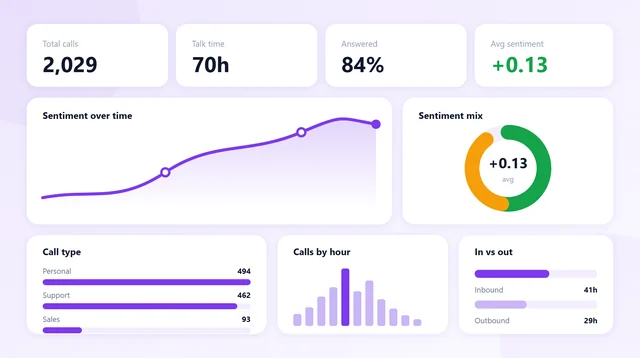
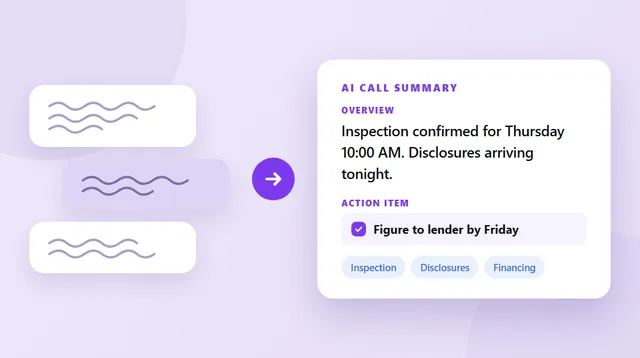
A recorded, transcribed call turns that conversation into text, and text can be context. That is the whole idea behind Epocra. Every call on your number is recorded and transcribed, so when you ask the AI tab “what did Maria want for the kitchen?”, the answer comes from what Maria actually said, not from a model guessing. The summary and follow-ups you get after each call work the same way: the transcript is the context, and the AI only has to read it carefully.
Turn every call into context your AI can use
Epocra records every call on your normal number, then writes the transcript, summary and follow-ups for you. Ask questions across all your calls.
Start free trialHow to give AI better context: practical tips
You don’t need to be technical to use any of this. These habits will noticeably improve the answers you get from any AI assistant:
- Say who you are and what you’re doing. “I’m a realtor with 30 active buyers and I’m writing a follow-up text after showings” gets a far better answer than “write a follow-up text.”
- Paste the source material. If your question is about a document, email, call transcript or spreadsheet, include it. Don’t ask the model to recall it from training or guess what it says.
- Show an example of what good looks like. One sample of the tone, format or length you want is worth a paragraph of description.
- Put the most important instruction at the start or the end. Models pay closest attention there. In a long prompt, restate the key ask at the bottom.
- Start fresh when a chat goes stale. If a conversation has wandered or the answers are getting worse, open a new chat and paste in a short summary of what matters.
- Use project instructions for things you repeat. If you’re always explaining your business, your style or your audience, save it once in the app’s custom instructions or project settings.
- Cut what doesn’t matter. Ten relevant lines beat a hundred loosely related ones. Clutter competes for attention.
- Don’t assume it knows what changed. Models have a training cutoff. For anything recent, such as new prices, new regulations or this week’s news, give it the facts or let it search.
The takeaway
An AI model is only as good as what’s on its desk. It brings enormous general knowledge from training, but everything specific (your situation, your documents, your goals, what you said ten minutes ago) has to be in the context, or it simply isn’t there.
So the next time an AI gives you a disappointing answer, before blaming the model, ask a better question: what did it actually have to work with? Most of the time, fixing the context fixes the answer.
Sources: Liu et al., “Lost in the Middle: How Language Models Use Long Contexts” (2023) · Chroma Research, “Context Rot”. Token counts and window sizes are general rules of thumb, not tied to any one model.
Frequently asked questions
Context is everything a language model can see when it writes its reply: the app’s hidden instructions, the conversation so far, any files or search results, and your latest message. Anything outside it does not exist to the model.
The maximum amount of text, measured in tokens, that a model can hold at once, counting both what goes in and the reply that comes out. Today’s leading models hold hundreds of thousands of tokens, and some more than a million.
A chunk of text a model reads, usually a short word or part of a longer one. In English one word is about 1.3 tokens, so a page of text is roughly 650 tokens.
The model remembers nothing between messages; the app re-sends the conversation each time. In a very long chat the oldest messages may be dropped or summarized to fit the window, so early details can fall off the desk.
No. Models use information at the start and end of the context best, and quality tends to drift as context grows. More text also costs more and runs slower. The right context beats the most context.
The practice of deciding what an AI model sees, when, and in what order, using retrieval, tools, standing instructions and summaries. It has largely replaced “prompt engineering” as the core skill behind good AI products.
James Ritter
Founder of Epocra. Fifteen years in payments, now building call intelligence for people who run their business from their phone.
Keep reading