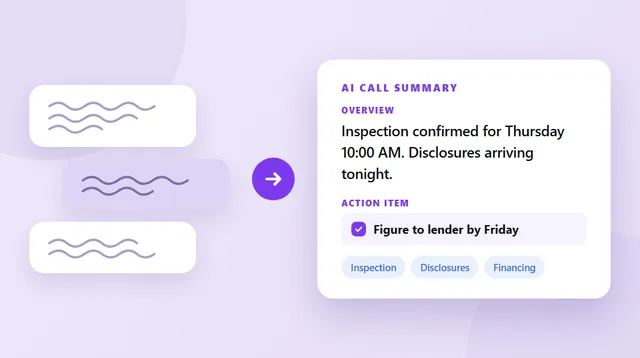
AI call analysis is AI reading your recorded calls and telling you what is in them. Look at everything at once: how many calls you made, how many got answered, whether the mood on an account has been sliding for a month. An AI call summary covers one call. Analysis is what all of them say together.
Epocra records and transcribes every call on your business number, then does the counting for you — how many calls, how many got answered, where the talk time went, the hours you actually get rung, and which way sentiment has been moving. Nothing to tag, nothing to log, and the categories are ones you write yourself.
See it in action
Every call recorded, written up and counted
An interactive demo — not a video — of Epocra working on a real set of calls. The recording happens on the line, the write-up lands by itself, and the totals build as the calls come in.
- Recorded on the line — both sides, any handset, nothing to switch on
- Written up automatically — an overview, the action items and the topics, per call
- The totals build themselves — volume, answer rate, talk time, sentiment over time
What AI call analysis actually is
Every business call produces information that outlives it: a commitment, a price, a hesitation, a deadline. Almost all of it evaporates — not because it wasn’t captured, but because it was captured somewhere unqueryable: your memory, a notebook, a CRM field filled in from memory two hours later.
AI call analysis changes what a recorded call is. Once calls are recorded and transcribed with speakers labelled, they stop being audio files and become a dataset — one you can count, group and read patterns from. The summary is the first, per-call layer of that. Analysis is everything above it: the per-contact layer (everything Dana has committed to across five calls) and the whole-archive layer (every deal that mentioned financing problems).
What it can pull out of your calls
| Signal | What it answers |
|---|---|
| Commitments | Who promised what, when, and whether it happened — both directions. The single highest-value output, because dropped commitments are how deals and clients quietly die. |
| Numbers & terms | Every price, date and quantity mentioned, with who said it — retrievable when the dispute arrives weeks later. |
| Topics over time | What each conversation covered, grouped and tracked with status — so “the roof issue” is visibly still open across three calls, not rediscovered in the fourth. |
| Outcomes & disposition | Resolved or not, sales or support, follow-up needed or closed — classification that turns a call list into a work queue. |
| Patterns you'd never log | Which clients call most, what always precedes a cancellation, which topics correlate with closed deals. Visible only at archive scale. |
The numbers: your calls in aggregate
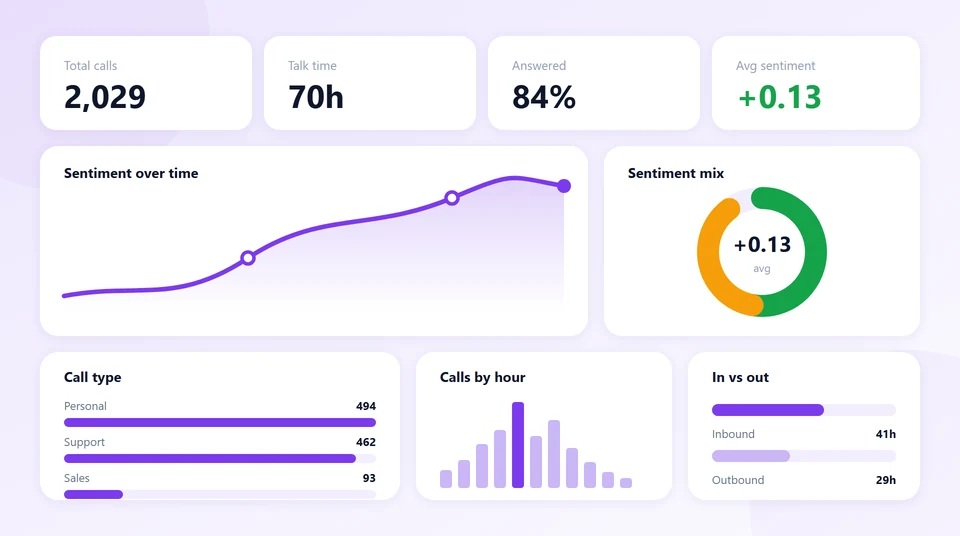
Every call that runs through Epocra is already timed, transcribed and scored, so the totals build themselves. There is nothing to tag and nothing to log.
- Volume and talk time — how many calls, how many hours, split inbound against outbound.
- Answered against missed — the ratio, tracked over time rather than guessed at.
- Talk versus listen — how much of each call was you, which is the one number most people are wrong about.
- When the phone actually rings — calls by hour, so the busy part of your day is a fact rather than a feeling.
- Sentiment over time — the average mood of your calls, and which direction it has moved week over week.
You choose which of these sit on the page. The cards and charts are swappable, so the dashboard shows the numbers you care about instead of a fixed set somebody else picked, and it exports when you need it somewhere else.
The dashboard lives on the desktop app and the web portal. Your phone is for taking the call. A dashboard of that size on a handset would be unreadable, so we didn’t build one — the calls, transcripts and summaries are all there, and the aggregate view is where there is room for it.
Categories you define yourself
Most tools sort your calls into categories somebody else invented, which is why the report never quite matches the business. Epocra lets you write your own, in a sentence.
You describe what belongs in a category in plain English — “anything where I’m the customer rather than the vendor,” say — and the AI classifies every call against that description from then on, counting them as it goes. A contractor separates quotes from scheduling from warranty calls. An agent splits buyers from sellers from lender calls. There is nothing to configure beyond writing the sentence, and the counts flow straight into the dashboard.
This is the part worth checking for in any tool you look at: whether the categories bend to your work, or your work has to bend to the categories.
For people who sell
Sales teams bought this category first, and the sales use reads differently: record and analyze your calls not for the record, but to get better. What did the calls that closed have in common? Where in the conversation do prospects go quiet? Did the discount actually move anything? Call-center platforms sell this as “conversation intelligence” with scoring dashboards and manager seats.
If you sell solo — agent, broker, contractor, consultant — you don’t need the manager seats. You need the same three primitives scaled to one person: every sales call recorded automatically, the commitments and numbers extracted, and the ability to review a deal’s whole call history before the next conversation. That last one — walking into a call having re-read the relationship in ninety seconds — is the closest thing to an unfair advantage this category offers.
How it works — and the gate everything depends on
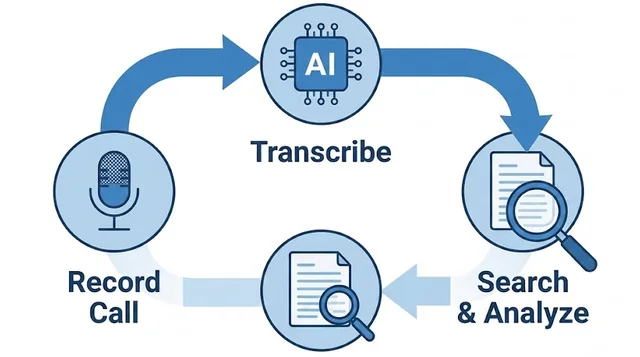
The pipeline: calls are recorded, transcribed with each speaker labelled, and indexed so that a language model can read across them. The extraction layers — summaries, topics, commitments — are generated per call and accumulate into the archive the totals are built from.
Notice what all of it depends on: the calls have to be recorded in the first place. You cannot analyze audio that was never captured, and this is where most tools quietly fail — they analyze meetings, because meetings happen on laptops where software can listen. Phone calls don’t. For the analysis to cover the calls that actually run your business, recording has to live on the phone line itself — automatic, both directions, every call. Miss the capture and the smartest model in the world has nothing to work with.
What to look for
- Real phone calls, captured automatically. The archive is only as complete as the recording. If capture requires remembering a button, the analysis has holes exactly where the interesting calls were.
- Numbers, not call scores — volume, answer rate and sentiment you can track over time, without per-rep scoring.
- Categories you define — the breakdown should match how your business splits its calls, not a fixed list.
- Per-contact memory — analysis that accumulates under the person, so relationships have history, not just calls.
- Consent handled properly — analysis runs on recordings, so recording law applies; the tool should make the notice your setting, not an afterthought.
What it can't do
It can’t analyze calls you didn’t record. Worth repeating because it shapes everything: the value compounds from the day capture becomes automatic, and no tool can backfill the calls before that.
Small archives make weak patterns. Ten calls tell you what happened; a hundred reveal habits. Early on, treat pattern-level claims (“clients usually…”) with suspicion, and the per-call facts — who said what, and when — with confidence.
It reports; it doesn’t decide. Analysis will tell you the discount didn’t move close rates. Whether to stop discounting is still your call — and the tools that pretend otherwise are selling call scores, not judgment.
What actually works
Epocra is built so the whole chain happens without you: your business number records every call from connect, transcribes it with speakers labelled, writes the summary, tracks topics with status, and files everything under the contact. The dashboard — on the desktop app and the web portal — is the layer above that: the totals build as the calls come in, broken down by the categories you defined.
Because capture is automatic on every call, the archive is complete from day one forward — the unexpected Tuesday call is in there next to the scheduled Thursday one, and six months of a client relationship reads back in a minute.
Your calls, counted
Every call recorded, summarized and filed — then the totals build themselves, in the categories you write.
Start free trialFrequently asked questions
On the desktop app and the web portal. Both show the same dashboard — volume, answered against missed, talk time, calls by hour, sentiment over time — and you pick which cards and charts appear. The mobile app carries your calls, transcripts and summaries; the aggregate view is on the bigger screens, where it is readable.
Yes. You write a plain-English description of what belongs in a category, and the AI classifies calls against it from then on, counting them into the dashboard. That means the breakdown reflects how your business actually splits its calls rather than a fixed list of labels.
AI reading recorded, transcribed calls and turning them into things you can use — commitments, numbers, topics and outcomes per call, and totals across all of them. A summary covers one call; analysis works across them.
Reliably: who said what, commitments and their owners, numbers and dates, topics and whether they were resolved, and call disposition (sales vs support, resolved vs open). At archive scale it also surfaces patterns — recurring issues, what precedes churn, what closed deals share.
A summary is the structured note from a single call. Analysis is the layer above: counting and comparing across calls. Good tools do both from the same recordings — the summary is what accumulates into the archive that analysis reads.
Sales call analytics is the sales-team flavor: scoring, coaching dashboards, win/loss patterns. Same pipeline underneath. Solo sellers usually want the primitives — automatic recording, extracted commitments, per-deal call history — without the manager tooling.
Not if the analysis runs on the line rather than the handset. A service that carries your business number records and analyzes identically on any iPhone or Android — the phone is just the microphone.
Analysis inherits recording consent law: one-party consent in most US states, all-party in some. See our state-by-state guide and when in doubt, tell the other side you record.
More in the Help Center: Transcripts, summaries and tasks.
James Ritter
Founder of Epocra. Fifteen years in payments, now building call intelligence for people who run their business from their phone.
Keep reading