A call note is an automatic summary and transcript of a phone call. Google builds the feature into the Pixel Phone app, where an on-device Gemini model transcribes the call and writes a short summary you can read afterwards. It is genuinely good. It is also restricted to the Pixel 9 and later, excludes the A series, runs in five countries, needs a matching local SIM, writes summaries only in English, and tells everyone on the call when it starts.
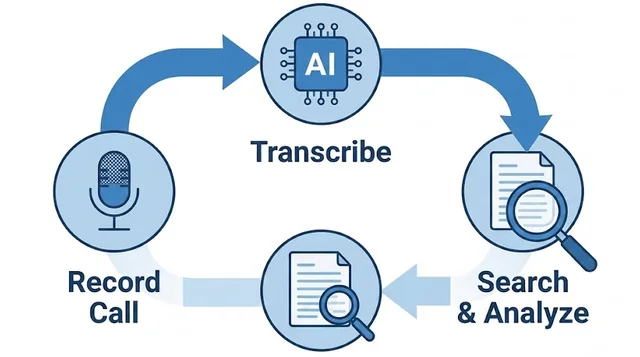
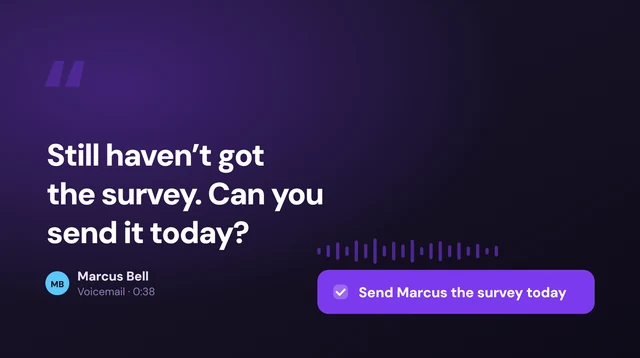
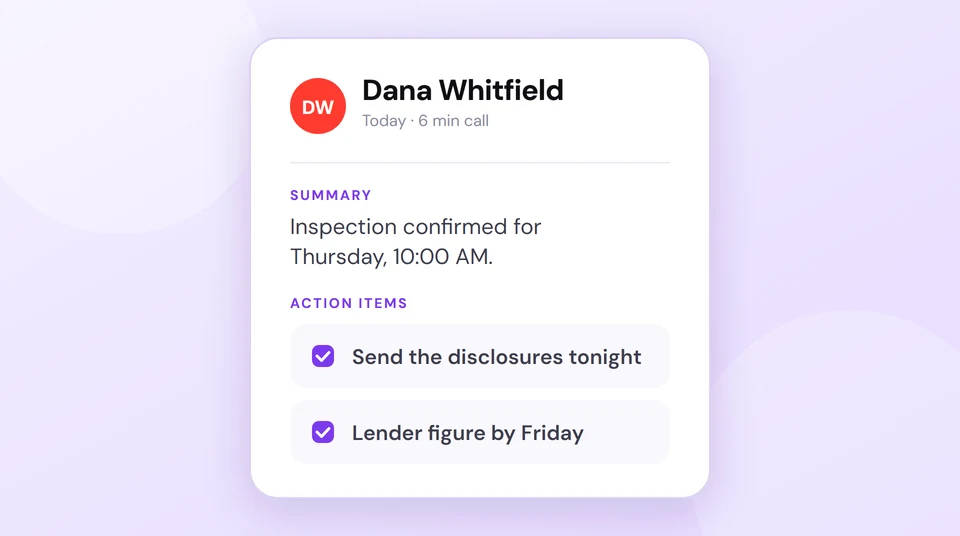
Get call notes on the phone you already own. Epocra works the same on iPhone and Android, whatever the model or country. Every call is recorded and transcribed the moment it connects, then summarised with the follow-ups pulled out as tasks.
And it does not stop at one call. The notes are searchable across every conversation you have ever had, and you can just ask — what did we agree on price? — and get an answer drawn from the transcripts, citing the call it came from. Whether a notice plays at the start is your setting, not a fixed rule of the operating system.
Try Epocra freeSee it in action
See how it works on Epocra
An interactive demo — not a video — of making a call and having it recorded and transcribed. The call ends, and seconds later the recording, transcript and AI summary are waiting — no button pressed, and no announcement mid-call when the notice setting is disabled.
- Recording starts at connect — nothing to interrupt
- Summary and action items after every call
- Filed to the contact, searchable months later
What a call note actually is
A call note is the written record a phone leaves behind after a conversation: a transcript of what was said, plus a short summary of what it amounted to. The idea is that you stop taking notes during calls, because the phone does it.
Two quite different things travel under the name. On a phone it means an automatic AI summary, which is what Google ships on Pixel. In business phone systems it usually means a box a rep types into after a call, which is a different product entirely — still manual, still dependent on someone remembering. This page is about the automatic kind.
Turning on Google Call Notes
If you have a supported Pixel, the feature is off until you enable it, and it does not live where most people look:
- Update the Phone app. Call Notes needs a current version, and it will pull down extra components the first time.
- Open the Phone app and tap More in the top right, then Settings.
- Tap Call Notes and switch it on. Follow the prompts and let the on-device model download — this part is not instant.
- During a call, tap Call Assist, then Call Notes. It does not start on its own.
- Read it afterwards in the Phone app, attached to that call.
The processing happens on the handset using an on-device Gemini model, and Google states the call contents stay on your device and are not shared with Google. For a feature that listens to your conversations, that is the right design.
Who can actually use it
This is where most people run aground. The requirements are narrower than the coverage suggests.
| Device | Call Notes | Notes |
|---|---|---|
| Pixel 9, 9 Pro, 10 series | Yes | In supported countries, with a matching SIM |
| Pixel A series (9a, 10a) | No | Google excludes the A series explicitly |
| Pixel 8 and earlier | No | Not supported at any software version |
| Samsung, OnePlus, Motorola | No | No equivalent built-in feature |
| iPhone, any model | No | iOS records calls but writes no summary |
On top of the hardware, there is geography. Call Notes runs in Australia, Canada, Ireland, the United Kingdom and the United States in English, in Japan in Japanese, and on the Pixel 10 in India. Google also requires a SIM from a matching country, so travelling with the wrong SIM can take the feature away. And summaries are generated in English only — other languages get a transcript without the summary that makes it worth having.
Add it up and the group who can use Call Notes is small: recent non-A-series Pixel owners in a handful of countries. Everyone else searching for this is looking at a feature they cannot switch on.
Everyone hears it start
When you activate Call Notes, the other person is told. Google confirms the participants are notified, and there is no setting to suppress it — the same design Apple uses for the iPhone recorder and Google uses for call recording on Android.
The reasoning is sound. An audible notice sidesteps a great deal of legal risk in places where recording requires everyone's agreement. But it has a cost that anyone who has tried it will recognise: the announcement lands in the middle of a live conversation, and people react to it. A supplier who was mid-sentence stops. A client asks what that was. The moment you were trying to capture is the moment the notice interrupts.
That is a very different thing from choosing to be transparent. Announcing at the start, in your own words, is a courtesy. A robotic interjection partway through a negotiation is an event.
Where it stops
Even on a Pixel that supports it, Call Notes is deliberately scoped to one call at a time.
The notes are stuck on the handset
On-device processing is good for privacy and bad for everything else. The summary lives in the Phone app on that phone. It is not on your laptop, not in a CRM, and not visible to anyone else on your team. Lose or replace the phone and the record of those conversations goes with it.
You cannot search across calls
A summary attached to a single call answers “what happened on this call”. It does not answer “when did we agree that price”, because that requires searching every conversation you have had with someone, and a per-call note has no way to do it.
Nothing becomes a task
A summary tells you what was said. It does not lift out the thing you promised to do and put it somewhere you will see it on Thursday. Reading a good summary and then forgetting the commitment inside it is a very easy way to lose a deal.
You still have to remember to press it
Call Notes does not start by itself. On the calls that turn out to matter — the unexpected ones — you will not have tapped Call Assist, because you did not know yet that the call was going to matter.
Call notes on iPhone
There is no built-in equivalent. iOS 18.1 and later can record a call and, on Apple Intelligence hardware, produce a transcript in the Notes app — but that is a transcript, not a call note. There is no summary of what the conversation amounted to, no follow-ups extracted, and no way to search across calls.
So the honest answer for iPhone owners is that Apple has not shipped this, and no App Store download can add it, because iOS does not hand call audio to third-party apps. The only route is a calling app that carries the call itself — where the recording and the summary happen on the line rather than on the handset.
What actually works
Handle it at the line rather than the device, and every one of those limits falls away at once.
Epocra gives you a business number that works the same on any iPhone or Android, in any country, on any model. Recording starts when the call connects — nothing to tap, nothing to remember on the call you did not expect to matter. Every call comes back transcribed with each speaker labelled, summarised in a few lines, with the follow-ups pulled out as tasks and the whole thing filed under the contact.
Because it is not trapped on a handset, the notes are searchable across every conversation you have ever had, and you can ask a question in plain English — what did we agree on price? — and get an answer drawn from the transcripts, citing the call it came from. And the recording notice is a setting you control: leave it playing for every caller, or switch it off where you are entitled to.
That is the difference between a note about a call and a record of your business.
Frequently asked questions
A call note is an automatic summary and transcript of a phone call, produced when the call ends, so you do not have to take notes during the conversation. Google ships the feature on recent Pixel phones; apps like Epocra provide it on any phone.
The Pixel 9 and later, excluding the A series. Pixel 8 and older do not get it, and no Samsung, OnePlus, Motorola or other Android phone has an equivalent. It also requires a supported country and a matching SIM.
Not from Apple. iOS can record a call and transcribe it on Apple Intelligence hardware, but it writes no summary and cannot search across calls. Because iOS does not expose call audio to third-party apps, the only way to get true call notes on an iPhone is a calling app that carries the call itself.
Yes. Google states the participants are notified when the feature is activated, and there is no setting to disable it. On Epocra the notice is an account setting, so you can decide — subject to the recording laws that apply to you.
In the Phone app, attached to that call in your history. Processing happens on the device with an on-device Gemini model, and Google says the contents are not shared with Google — which also means they are not on your computer or available to your team.
No. Summaries are English only. Other supported languages produce a transcript without the summary, which is the part that makes the feature useful.
More in the Help Center: What the summary contains.
James Ritter
Founder of Epocra. Fifteen years in payments, now building call intelligence for people who run their business from their phone.
Sources: Google Help — Use Call Notes in the Phone app · Apple Support — Record and transcribe a call. Device support, country availability and language limits verified August 2026.
Keep reading