Voicemail to text turns a message somebody left you into words you can read. On iPhone, Live Voicemail transcribes as the caller is speaking, and visual voicemail transcripts arrive afterwards where your carrier supports them. On Android there is no single built-in version — it depends on your carrier, or on running your line through Google Voice. Accuracy varies wildly, and it is worst on exactly the messages that matter: names, numbers, addresses.
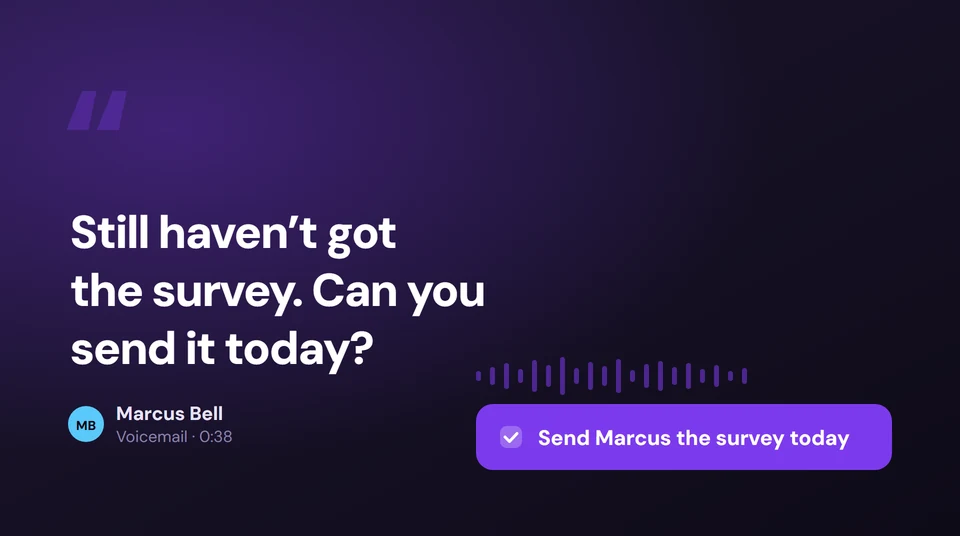
A voicemail is almost never information. It is a request. Somebody wants a document, a call back, a date confirmed. Turning that into text is only half the job — the useful half is making sure the thing they asked for actually gets done.
Epocra transcribes every voicemail on your business line and files it against the contact along with the rest of your history with them, so the follow-up surfaces as something to action rather than a message you have listened to and mean to deal with later. And it is searchable months on, next to every call you have had with that person.
Try Epocra freeSee it in action
See how it works on Epocra
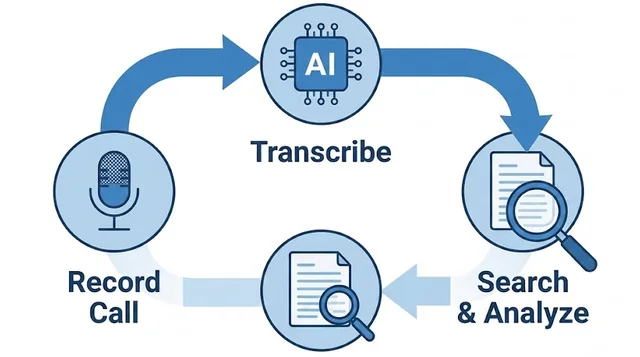
An interactive demo — not a video — of making a call and having it recorded and transcribed. The call ends, and seconds later the recording, transcript and AI summary are waiting — no button pressed, and no announcement mid-call when the notice setting is disabled.
- Recording starts at connect — nothing to interrupt
- Summary and action items after every call
- Filed to the contact, searchable months later
What voicemail to text actually is
Voicemail to text — also called voicemail transcription, or visual voicemail where the carrier brands it that way — is speech-to-text applied to the message somebody leaves you. Instead of dialling in and listening, you read it.
The appeal is obvious. Voicemail is the slowest medium anyone still uses: strictly linear, no skimming, and you have to be somewhere you can listen. Reading is simply faster — you can scan a transcript in a meeting in the time it would take to unlock your phone and dial in.
The catch is that the quality of the transcript decides whether you trust it enough to skip the audio, and most people quickly learn not to. Which is why a page like this one usually ends with “install a better app” — and why that turns out to be the wrong ending.
Voicemail to text on iPhone
There are two separate features on iPhone and they get confused constantly.
Live Voicemail
Introduced in iOS 17, Live Voicemail transcribes in real time while the caller is speaking, on the device, so you can read the message as it is being left and pick up mid-way if it turns out to matter. Turn it on in Settings › Apps › Phone › Live Voicemail. It needs a supported language and region, and it does not work when a call is being forwarded to carrier voicemail instead.
Visual voicemail transcripts
Separately, iPhone can show a transcript of a saved voicemail in the Phone app under the Voicemail tab. This one depends on your carrier supporting visual voicemail at all. Where it works, the transcript appears under the message a short time after it lands.
If you see no transcripts, the usual reasons are that your carrier does not offer visual voicemail, your region is unsupported, or the message came through a call-forwarding path that bypassed the feature.
Voicemail to text on Android
There is no single Android answer, which is why this is the more searched half of the topic.
- Carrier voicemail to text. Most major carriers offer it, sometimes bundled and sometimes as a paid add-on, and usually branded as visual voicemail. Quality and price vary by carrier, and it is worth checking whether yours charges for it.
- Google Voice. Transcribes voicemail automatically and emails you the text. It works well, but it means running your calls through a Google Voice number, which is a bigger change than most people expect.
- The Google Phone app. On some devices and carriers it surfaces visual voicemail with transcription; on others the same app shows nothing at all, because the feature depends on the carrier rather than the app.
The practical result is that two people with the same Android phone on different networks get completely different experiences, which is exactly why generic instructions for this so rarely work.
Voicemail to text on Samsung
Samsung gets asked about separately, and the honest answer is that Samsung is not really the variable. One UI does not add its own transcription layer, so what you get is whatever your carrier provides, delivered either through the Phone app or through the carrier’s own visual voicemail app.
So the steps are the same as any other Android handset: open the Phone app, go to the Voicemail tab, and see whether transcripts appear under your messages. If they do not, the question to ask is what your carrier offers, not what your phone supports. Two identical Galaxy handsets on different networks behave differently, which is why so much of the advice written about this does not match what people see.
The apps people actually use
Once the built-in option disappoints, most people go looking for an app. These are the ones that come up, and what each is really for — because they are not solving the same problem.
| Option | Cost | What it does | The catch |
|---|---|---|---|
| Your carrier’s visual voicemail | Usually included, sometimes an add-on | Transcripts appear under each message in the Phone app | Quality varies a lot by carrier, and some still charge for it |
| Google Voice | Free | Transcribes every voicemail automatically and emails you the text | Means running your calls through a Google Voice number |
| YouMail | Free tier, paid plans | Transcription plus spam blocking and custom greetings | A voicemail app bolted onto your existing line — your calls stay elsewhere |
| Epocra | Paid | Voicemail transcribed and filed with every call from that contact, follow-ups surfaced | It is a business line rather than an add-on to your personal number |
The distinction worth holding on to: the first three are all ways to read a voicemail. They differ in accuracy and price, but they end in the same place — a message you have now read. The question of whether the thing being asked for actually gets done is untouched by any of them.
Why the transcripts disappoint
Voicemail is close to the hardest audio speech recognition ever gets, and it is worth understanding why before blaming the software.
The audio is narrowband telephone quality to begin with, then compressed again by the voicemail system. Callers leave messages from cars, pavements and airports. They speak fast because they know the beep is running. And the single most important thing in the message is usually the hardest category of all for a recogniser: a proper name, a phone number, an address, a reference code.
So you get transcripts that are readable but not trustworthy — fine for “who was this and roughly what did they want”, useless for “what was the number they left”. Most people end up listening to the audio anyway whenever it matters, which quietly defeats the point.
Text is not the job
Here is the thing that no built-in voicemail transcription addresses, and it is not a technical limitation — it is a question of what the feature is for.
Almost nobody leaves a voicemail to inform you of something. They leave one because they want something: send the document, confirm the date, call me back before Friday. The message is a request with a deadline attached.
Turning that into text on a screen does not discharge the request. It just means you have now read it as well as heard it. The message still sits in a list of messages, the commitment inside it still lives only in your memory, and the failure mode is unchanged: you listened to it on Tuesday, meant to deal with it, and remembered on Friday.
That is the actual problem with voicemail, and transcription on its own does not touch it.
What actually works
Treat a voicemail as part of the conversation with that person rather than a message in a separate inbox.
On Epocra, voicemails left on your business line are transcribed automatically and filed against the contact next to every call you have had with them. You are not looking at an isolated message in a voicemail list; you are looking at the latest thing in a running history, with the follow-up surfaced alongside the ones from your calls.
Because it sits in the same place as everything else, it is searchable months later, and you can ask about it in plain English — what did Marcus need from me? — and get an answer drawn from the transcripts, citing where it came from. A missed call stops being a message you have to remember to act on, and becomes another entry in the record of the relationship.
Frequently asked questions
On iPhone, enable Live Voicemail in Settings › Apps › Phone for real-time transcription, and check the Voicemail tab for carrier transcripts of saved messages. On Android it depends on your carrier's visual voicemail service, or you can use Google Voice, which transcribes automatically.
Voicemail audio is narrowband and compressed twice, callers are usually in noisy places and speaking quickly, and the important parts — names, phone numbers, addresses — are the hardest things for any recogniser to get right. Transcripts are generally good enough to triage a message and not reliable enough to act on a number without listening.
On iPhone, Live Voicemail is a free part of iOS. Carrier visual voicemail transcription is sometimes included and sometimes a paid add-on, so it depends on your plan. Google Voice transcription is free.
There is no universal built-in version. It depends on whether your carrier offers visual voicemail with transcription, or whether you route calls through Google Voice. Two people with the same handset on different networks can get completely different results.
Not usefully with the built-in tools — a transcript attached to one message in a voicemail list is not searchable across your history. That needs the voicemails to live alongside your calls rather than in a separate inbox.
With the built-in features, nothing — it stays a message you have read. Since a voicemail is nearly always a request, the useful step is making sure the thing being asked for is captured somewhere you will actually see it again.
More in the Help Center: Reading your voicemail.
James Ritter
Founder of Epocra. Fifteen years in payments, now building call intelligence for people who run their business from their phone.
Sources: Apple Support — Use Live Voicemail · Google Voice Help — Voicemail transcription. Carrier availability varies and changes; verified August 2026.
Keep reading