No — not the part that matters. You can start a screen recording during a phone call on either iPhone or Android, and you will get a video of the screen. What you will not get is the conversation. Both operating systems deliberately exclude the call audio from screen capture, so the file comes back silent, or with nothing on it but your own voice picked up through the microphone.
Most people who try this are really trying to get around one thing: the announcement Apple attaches to its own recorder. That announcement is Apple’s product decision. What the law asks of you is a separate question, and the answer depends on which state you are in.
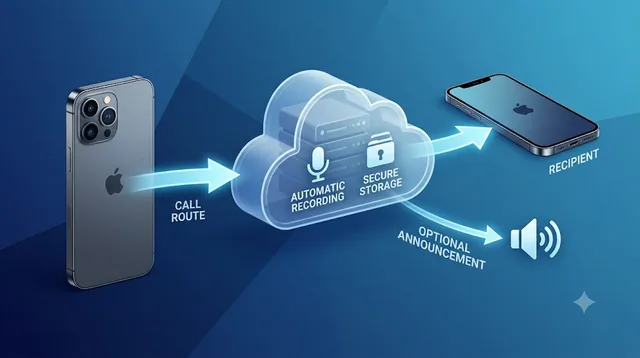
Epocra records the call on the line rather than on the handset, the same way every business phone system does. Recording starts the moment the call connects, both sides, at full quality — and whether a notice plays is an account setting, so it can match the consent your state requires rather than an operating system’s house style.
See it in action
Recording that starts when the call does
An interactive demo — not a video. The call connects, recording is already running, and seconds after it ends the summary, the action items and the transcript are waiting.
- Recording starts on connect — nothing to press once the conversation is underway
- Both sides at full quality — captured on the line, not through a speakerphone
- The notice is your setting — switch it on or off to match the law where you are
What actually happens when you try it
It is a reasonable thing to try. Screen recording is already on your phone, it is free, and it feels like it should work — if the phone can record what is on the screen, why not what is coming out of the speaker?
Here is what you get in practice.
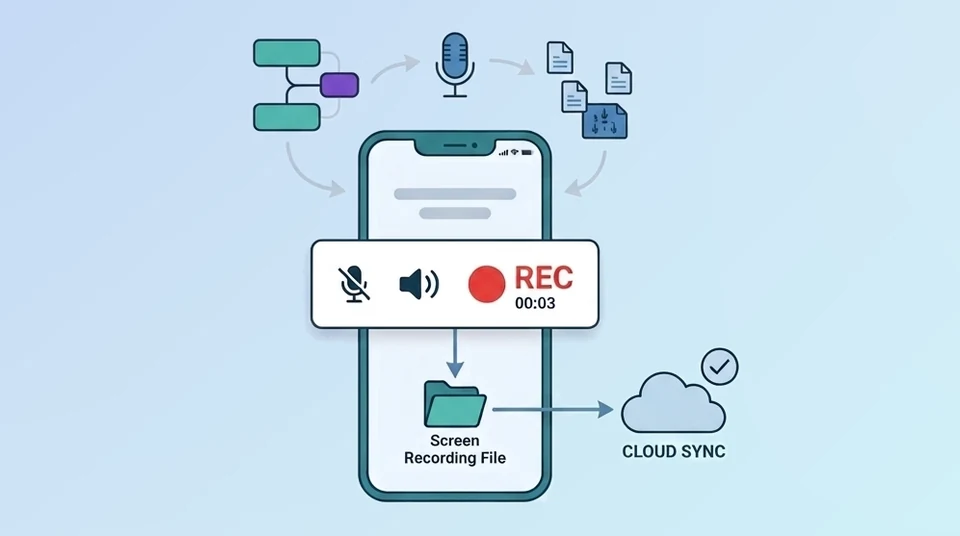
On iPhone. Swipe down for Control Center, tap the record button, and the countdown starts. Place or answer a call and the recording keeps running. When you stop it and open the file in Photos, you have a video of your call screen — the timer counting up, the mute and speaker buttons — and silence. The other person’s voice is not there. Depending on your iOS version and how the call was started, the recording may also stop on its own the moment the call connects.
On Android. The built-in screen recorder asks what audio you want before it starts: none, microphone, or device audio. Device audio sounds like the right answer and is not — the call stream is excluded from it. You end up in the same place: a video of the screen with either nothing or just your half of the conversation.
The one thing that does change the outcome is turning the microphone on and putting the call on speaker, which is a different technique with its own problems. That is covered below.
Why the phone blocks it
This is not a bug, a missing setting, or something a better app could solve. Apple and Google both made a deliberate decision that the audio stream belonging to a phone call is off limits to everything else running on the device.
Apple has never exposed call audio to third-party apps at all. That is the same restriction that forces every iPhone call recorder on the App Store to route your call through an outside phone line rather than record it on the handset — they are not being clever, they are working around a wall.
Google went the other way and then reversed. Android call recorder apps used to work by abusing the Accessibility API, a feature built for screen readers. In 2022 Google closed that door, and the apps that depended on it stopped working overnight. Screen recording was never a way back in; the call stream is excluded there too.
The practical takeaway: if a method records a call from inside the phone, it is either using a loophole that will close, or it is not really recording the call.
If you are doing this to avoid the announcement
Plenty of people arrive at screen recording for a specific reason. They already know the iPhone can record calls now — and they know that when it does, it says so out loud, to both people, with no way to turn it off. Screen recording looks like a side door.
It is worth being direct about this: screen recording does not get you past the announcement. It gets you nothing at all. You have avoided the notice by failing to record the conversation.
There is a second thing worth being direct about, and it matters more than the technique. Which button you press has no bearing on the law. Recording rules are written around whether the people on the call agreed to be recorded, not around the software you used. If you are in a state that requires everyone’s consent, a quiet method is still the violation. If you are in a state that only requires yours, the announcement was never a legal problem in the first place — just an awkward one.
That distinction is the whole subject of two other pieces here: what the iPhone announcement actually is and what the real alternatives are, in iPhone call recording without the announcement, and which rule applies where you live, in call recording laws by state.
The speakerphone workaround, honestly assessed
There is one approach that does produce audio, and you will find it recommended all over the internet: put the call on speaker, then record the room. Either turn the microphone on for your screen recording, or use Voice Memos, or point a second phone at the first one.
It works, in the narrow sense that you end up with a file containing both voices. Here is what you are actually signing up for.
| What you get | What it costs you |
|---|---|
| Both sides of the call, captured ambiently | Room-quality audio: echo, background noise, and the other person sounding distant and thin |
| Works without any extra software | Everyone nearby hears the call, so it is unusable in an office, a car with passengers, or anywhere public |
| Free | You have to remember to set it up before the call starts, every single time |
| Nothing announces it | Transcription of a room recording is noticeably worse, and your legal obligations have not changed at all |
For one important call you were expecting, in a quiet room, it is better than nothing. As a way of keeping a record of your calls, it collapses immediately — because the calls that turn out to matter are almost never the ones you saw coming.
Video calls are a different question
If what you actually want to capture is a FaceTime, WhatsApp, Zoom or Google Meet call, the answer changes. These are apps, not the phone dialler, and screen recording treats them differently — you can capture the picture, and depending on the app and platform, some or all of the audio.
It comes with its own catches, including what the app tells the other participants. Those are worth their own guide rather than a paragraph here.
Will the other person know?
Not from the screen recording itself. Unlike a FaceTime screenshot, iOS and Android do not notify the other party that you started a screen recording, and there is no sound or icon on their end.
That is a fact about the software, not permission. What the other person is entitled to know is set by the law where you both are, and in a good number of states the answer is that they are entitled to know before you start. It is genuinely worth checking your state before you rely on a recording for anything that matters — a recording made without the consent your state requires is not just risky to make, it can be worthless as evidence.
What actually records a call
Every method that genuinely captures both sides of a phone call has one thing in common: it does not happen on the handset. The recording is made somewhere on the line the call travels along, where the audio exists in full and the operating system has no say.
That is how Epocra works. Calls made and received through Epocra run over its own network, and the recording happens there. There is nothing for iOS or Android to block, nothing to remember to switch on, and no speakerphone. Both sides come back clean, on every call.
What arrives afterwards is the part people actually use. Not a twenty-minute audio file to scrub through, but an email waiting when you hang up: who called, how long it ran, a short account of what was discussed, the action items, the key takeaways, and the topics the call touched — with a link to the full transcript if you need the exact words. Most of the time you never open the recording at all, because the answer to “what did we agree to?” is already sitting in your inbox.
Whether a notice is played to the other party is an account setting, because the right answer depends on where you are and who you are calling — which is a decision the law makes for you, not one an operating system should make on your behalf.
Stop trying to trick the phone
Epocra records the call on the line, not on the handset — both sides, automatically, with a transcript when you hang up.
See pricingIs any of this legal?
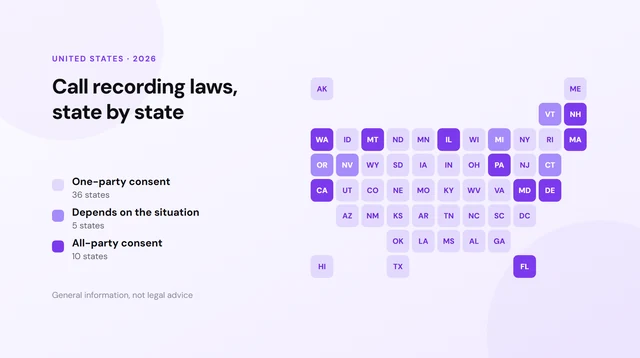
Recording a call you are part of is legal across the United States as long as the consent requirement where you are is met. Federal law and most states require only one party to agree, and you are that party. A meaningful minority — California, Florida, Illinois, Pennsylvania, Washington and several others — require everyone on the call to agree.
Two things trip people up. Calls that cross state lines can pull in the stricter state’s rule, and the method you used is irrelevant to all of it. Screen recording, a second phone, a paid service — the question is only ever whether the consent required was obtained.
The full breakdown, state by state, is in call recording laws by state. This is general information rather than legal advice, and if a recording is going to matter, it is worth asking someone qualified about your specific situation.
Frequently asked questions
You can start a screen recording during a call, but iOS excludes call audio from screen capture, so you get a video of the screen with no conversation on it. On some iOS versions the recording stops by itself when the call connects.
Because the phone is designed that way. Both iOS and Android keep the call audio stream separate from anything screen recording can reach. It is not a setting you have missed.
It avoids the announcement only because it does not record the call. If you need the conversation captured, screen recording is not a workaround, and no method changes the consent your state requires.
No. Neither iOS nor Android tells the other party that you started a screen recording. That is a fact about the software and not a substitute for the consent the law may require.
Video and internet calls behave differently to a normal phone call, because they are apps rather than the dialler. Screen recording captures the picture, and audio capture varies by app and platform.
Any method that records on the line rather than on the handset. Services that carry the call can record both sides at full quality without fighting the operating system, which is how Epocra records every call automatically.
Epocra emails you a summary of every call rather than the audio file: what was discussed, the action items and key takeaways, with a link to the full transcript. It is usually faster than replaying a recording.
More in the Help Center: Which calls are recorded.
James Ritter
Founder of Epocra. Fifteen years in payments, now building call intelligence for people who run their business from their phone.
Sources: Apple Support — Record and transcribe a call · MacRumors · Tom's Guide. Device support and regional availability verified July 2026.
Keep reading