You can record calls on Android, but you can’t record them quietly. Google’s Phone app has call recording built in, and when you start it both parties are notified with a disclosure that the call is being recorded. Google documents no setting to switch that off. The third-party recorder apps people used to reach for are mostly gone: Google’s Play policy states the Accessibility API "is not designed for and cannot be requested for remote call audio recording."
Use a calling app designed to record the entire conversation from the beginning. Epocra allows recording to begin as soon as the call connects. There is no button to press halfway through and no announcement interrupting the conversation. Every call can be automatically recorded, transcribed, and summarized.
You also control whether a recording notice plays when the call begins. Leave it enabled to notify both parties, or disable it in your settings when legally permitted. Recording laws vary by jurisdiction, and some require consent from everyone on the call, so it is your responsibility to understand the rules that apply.
Try Epocra freeSee it in action
See how it works on Epocra
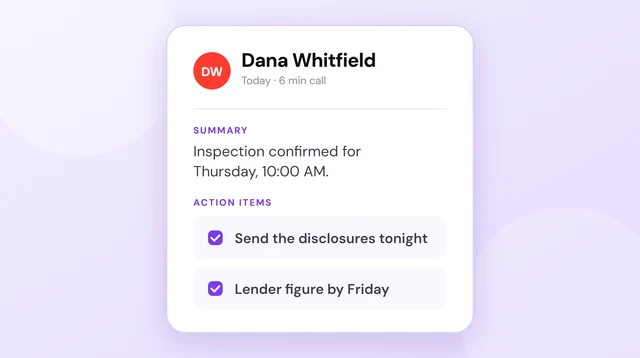
An interactive demo — not a video — of making a call and having it recorded and transcribed. The call ends, and seconds later the recording, transcript and AI summary are waiting — no button pressed, and no announcement mid-call when the notice setting is disabled.
- Recording starts at connect — nothing to interrupt
- Summary and action items after every call
- Filed to the contact, searchable months later
Can you turn off the call recording announcement on Android?
No — not on the recorder built into Google’s Phone app. Google’s own documentation describes the disclosure as automatic: when you start recording, both parties are notified that the call is being recorded. There is no documented toggle, and no hidden menu that removes it.
This is the same design decision Apple made on the iPhone, and probably for the same reason. Most US states let a participant record a conversation with only their own consent, but a smaller group require consent from everyone involved, at least in some circumstances. A recorder that ran silently would make it easy to fall foul of those rules without realising. Building the notice in means everyone on the call is told — though notice and legal consent are not the same thing, and an announcement on its own is not a guarantee of compliance.
Read the threads and the complaint is almost never "I want to record someone secretly" — it’s that the announcement lands in the middle of the conversation. You’re already talking, you realise the call matters, you tap record, and everyone gets interrupted. That is a fixable problem, and the fix isn’t a workaround.
Recording the built-in way (announcement and all)
If you’re fine with the notice playing, Google’s own feature is free and works well. Here’s the sequence:
- Start or answer a call in the Phone by Google app.
- Tap Record on the call screen. If you don’t see it, your device, carrier or region doesn’t support it — see the table below.
- Wait for the disclosure. Both parties are notified that recording has started.
- Talk. Tap Stop recording, or just end the call.
- Find it later in the call history: open the call in Recents and the recording is attached to that entry.
The disclosure isn’t optional and Google documents no way to disable it. It provides clear notice, though it does not by itself guarantee compliance in every jurisdiction or circumstance.
Which Android phones support call recording
This is the part that catches people out: the Record button simply isn’t there on a lot of phones, and it isn’t a setting you’ve missed.
| Device | Requirement | Recording |
|---|---|---|
| Pixel | Pixel 6 or later, Android 14 or later | Yes |
| Other Android phones | Android 9 or later | Yes |
| Older Pixels / older Android | Below those versions | No |
| Unsupported region or carrier | Any device | No |
Availability is also regional. Google’s documentation says call recording is widely available but not in all countries or regions, and that only certain devices and carriers support it. That is why two people with the same phone model can see different things.
Why third-party call recorder apps stopped working
If you remember installing a call recorder from the Play Store a few years ago and it working, you aren’t misremembering. Those apps leaned on Android’s Accessibility API to get at call audio, and Google closed that door in a policy update on 6 April 2022, which states plainly that the Accessibility API "is not designed for and cannot be requested for remote call audio recording."
So the App-Store-style answer doesn’t work here either. What circulates instead is the same three workarounds you’ll find on the iPhone side:
| What’s promised | What it actually is | Catch |
|---|---|---|
| "Hidden Android setting" | Doesn’t exist | No such toggle in the Phone app |
| Second device on speakerphone | Another phone or recorder in the room | Poor audio, still needs consent |
| Third-party recorder app | Usually adds a recording line via a conference call | Manual setup, extra dialling steps, inconsistent call handling |
None of them are good solutions.
What Actually Works: Epocra
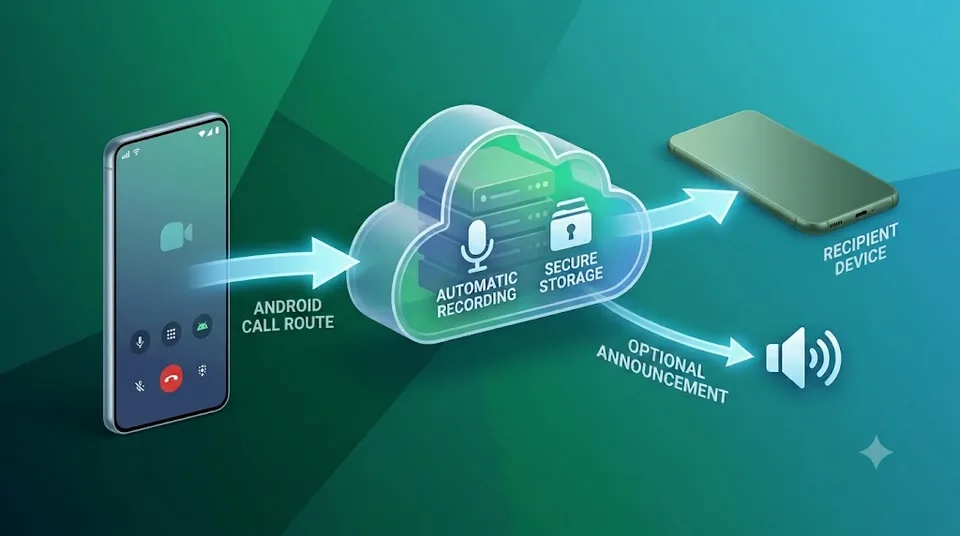
That problem has a clean fix, and it isn’t a workaround. Two things change. First, recording begins the moment the call connects, so there is nothing left to interrupt. Second — and this is the part neither Google’s nor Apple’s recorder will do — the announcement is a setting you own, and you can switch it off entirely. Where the law allows it, you turn it off and no announcement plays at any point in the call.
Leave it switched on instead and it plays as part of the greeting, the same way it works every time you ring a company and hear "this call may be recorded" before anyone picks up — disclosure up front, before the conversation starts, rather than cutting into it halfway through. Either way, the mid-call interruption is gone.
- No mid-call interruption — recording is already running before you say hello.
- Works regardless of handset, carrier or region — recording happens on the line, so the Record button being missing from your phone stops mattering.
- The announcement can be turned off — it’s an account setting, not something the phone forces on you. The rules that apply to your calls are still yours to check.
That’s how Epocra works. Calls route through your Epocra number, so recording starts at connect rather than when you remember to press something — and because it happens on the line rather than on the handset, whether your particular Android phone exposes a Record button never enters into it. You get the recording, a transcript and a summary, with no robot cutting into your conversation.
Where Android call recordings are saved
Recordings from Google’s Phone app stay on the handset. Google’s documentation is explicit that to keep recordings private they are stored on your device, and that calls aren’t saved or backed up off-device. You reach them through the call history — open the call in Recents and the recording is attached to that entry.
That privacy default has a flip side worth understanding before you rely on it: a recording that lives only on one handset is a recording you lose with the handset, and there is nothing linking it to the contact, the deal, or the commitment you made three months ago. Epocra keeps them in your account instead, so every recording, transcript and summary is available from any device — and the app syncs your transcripts and summaries onto the phone, so your call history stays searchable even with no signal.
What the built-in feature doesn’t do
For a one-off call — an interview, a quote, instructions you want to keep — Google’s version is genuinely all you need, and you should just use it. It stops being enough when recording calls is a routine part of your work rather than an occasional thing.
You have to remember, every single time
The Record button is manual. The calls you most wish you’d recorded are the ones where you didn’t know in advance that the conversation mattered — the quick check-in where a client moves the date, or a number gets quoted in passing.
A recording is not a record
An audio file attached to a call log entry is only findable if you remember which call it was in. Nothing lets you ask what a client agreed to three months ago, and nothing surfaces the commitments you made across a week of calls.
| Android built-in | Epocra | |
|---|---|---|
| Cost | Free | From $9.99/mo |
| Available on your phone | Device, carrier and region dependent | Any iPhone or Android |
| Starts recording | You tap, every call | Automatic |
| Announcement | Always, can’t be disabled | Your setting |
| Transcript | No | Every call |
| Organised by contact | No | Yes |
| Search across all calls | No | Yes |
Every call recorded, transcribed and summarised
Recording starts the moment the call connects — nothing to press, and no announcement cutting into the conversation.
Is it legal to record a call on Android?
It depends where everyone on the call is, and it is a legal question rather than a technical one. Most US states let a participant record a conversation with only their own consent. A smaller group require consent from everyone involved, at least in some circumstances, and calls that cross state lines can bring more than one rule into play. The safest approach is to tell people you’re recording and keep the notice on unless you have a good reason not to.
Nothing here is legal advice. If recording calls is a routine part of how you work, it is worth getting a clear answer for the states you actually do business in.
Frequently asked questions
It’s a two-part answer. On Google’s built-in recorder, you can’t — the disclosure is automatic and Google documents no way to disable it, and the Accessibility API route that third-party apps used is blocked by Play policy. On Epocra, you can. Calls route through your Epocra number rather than the handset, so recording starts the moment the call connects, and whether a notice plays is an account setting you can switch off where the law allows.
Your device, carrier or region doesn’t support it. Non-Pixel phones need Android 9 or later; Pixels need a Pixel 6 or later on Android 14 or later. Google also says recording is not available in all countries or regions.
Mostly no. A 2022 Google Play policy update states the Accessibility API "is not designed for and cannot be requested for remote call audio recording," which is what those apps relied on. What is left tends to be conference-bridge dialling rather than true call recording.
On the device. Google says recordings are stored on your phone and aren’t saved or backed up off-device, and you reach them through the call history entry.
Availability on any Android handset depends on the manufacturer, the carrier and the region, so what you see on a Samsung may differ from a Pixel. The constant is the notice: the recorders that ship on Android phones disclose recording to both parties.
Yes. Unlike speakerphone workarounds, recording on the line captures both sides properly.
James Ritter
Founder of Epocra. Fifteen years in payments, now building call intelligence for people who run their business from their phone.
Sources: Google — Record calls with the Phone app · Google Play — policy announcement, 6 April 2022. Device, region and policy details verified July 2026.
Keep reading