A call log template is a spreadsheet with one row per call you made or took — who, when, why, what happened, and what you owe them next. It is the running index of your day on the phone. Free, no email address required. (Notes from inside a single call are a different tool: the call notes template.)
Prints to one page · the spreadsheet has an example row and 200 formatted rows · Google Sheets: File → Import → Upload
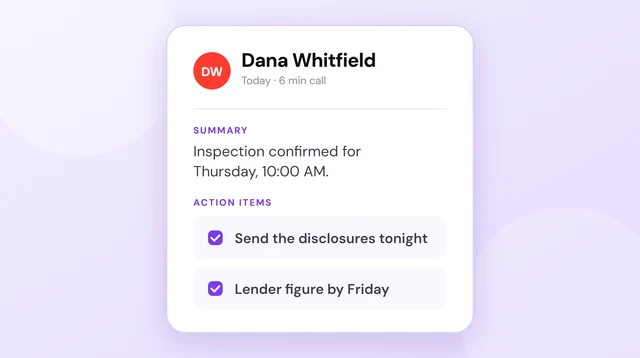
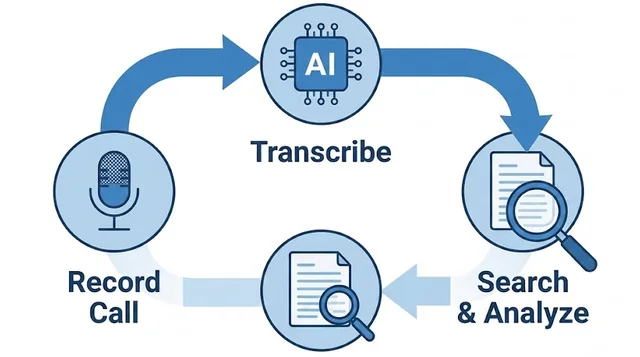
The better version of a call log is the one you never fill in. Epocra records every call as it happens, transcribes it, writes the summary, and files it under the contact — a complete log with the notes attached, built automatically while you talk.
See it in action
The log that fills itself in
An interactive demo — not a video — of a call being recorded and transcribed. The call ends, and seconds later the summary, the follow-ups and the filed record are waiting: everything the template asks you to type, already written.
- Every call becomes a row — automatically, including the ones you forgot to log
- Summary and next steps written for you after every call
- Filed to the contact, searchable months later
What 957 logged calls actually look like
Every template page tells you which columns to keep. Almost none of them show you a filled-in log, because almost nobody publishing one has a few thousand logged calls to hand.
We do. What follows is our founder’s own business line — one phone, 16 February to 10 August 2026 — logged automatically, every call, with nothing typed after a hang-up. Calls to and from our own test devices and internal lines are stripped out; what is left is 957 real conversations with 212 different numbers, across 125 days.
calls logged
16 Feb – 10 Aug 2026, 212 numbers
were answered
92% outbound, 75% inbound
median answered call
29% ran under a minute
of the talking was ours
across 657 transcripts
When people actually pick up
Calls by hour of day
957 calls, February to August 2026, one business line.
Show the numbers
| Hour (HST) | Calls | Answered | Rate |
|---|---|---|---|
| 1a | 1 | 0 | 0% |
| 2a | 2 | 0 | 0% |
| 3a | 2 | 0 | 0% |
| 4a | 13 | 0 | 0% |
| 5a | 11 | 0 | 0% |
| 6a | 25 | 11 | 44% |
| 7a | 102 | 73 | 72% |
| 8a | 183 | 162 | 89% |
| 9a | 203 | 170 | 84% |
| 10a | 143 | 119 | 83% |
| 11a | 99 | 91 | 92% |
| 12p | 64 | 57 | 89% |
| 1p | 36 | 35 | 97% |
| 2p | 20 | 19 | 95% |
| 3p | 23 | 21 | 91% |
| 4p | 9 | 9 | 100% |
| 5p | 6 | 5 | 83% |
| 6p | 6 | 5 | 83% |
| 7p | 5 | 5 | 100% |
| 8p | 3 | 3 | 100% |
| 9p | 1 | 1 | 100% |
The shape of that chart is the whole argument. It is not a normal working day, because the person on this line lives in Hawaii and most of the people he calls are five or six hours ahead — so his phone is busiest between 7am and 11am, and 29 calls arrived between 1am and 5am. Not one of those was answered. Every one of them is in the log.
Your shape is different. That is the point. Nobody can hand you this chart in a template, because it is made of your calls, and it only exists if every call got logged — including the ones you would never have written down.
- You reach people more reliably than they reach you. 92% of outbound calls connected; only 75% of inbound ones did. The missing quarter is inbound — the calls whose timing you did not choose.
- 38% of calls happen outside 9 to 5. A log shaped like a working day is missing more than a third of the record.
Do not borrow anybody’s hours, including ours. Epocra’s call analytics break your own answered and missed calls down by hour and by day, so the pattern you act on comes from your business and your callers rather than from someone else’s time zone.
Most calls are short. The talking is not in them.
The median answered call ran 2 minutes 16 seconds, but the distribution is lopsided to the point of absurdity. 29% of answered calls were under a minute, and together they account for 2.5% of all the time spent talking. The longest 10% of calls account for 44% of it.
This is the arithmetic that kills manual logging. Most rows are cheap to write and hold almost nothing; the value is concentrated in a handful of long calls — which are exactly the ones you finish too drained, too late, or too far behind to write up properly.
Who did the talking
Share of speaking time
Measured across 657 calls with speaker-labeled transcripts.
Across those calls our founder spoke for 27% of the time and listened for 73%. Per call the median was 34%. He did more than half the talking in fewer than one call in four.
No spreadsheet column can hold that number, and you cannot estimate it either — everyone guesses low while they are talking and high while they are bored. It comes from a transcript with speaker labels and word-level timestamps, or it does not come at all.
Method. Epocra’s own account, 16 February to 10 August 2026. Calls to and from our own test devices and internal lines are excluded; the 957 that remain are real conversations with 212 outside numbers. A call counts as answered when the audio path connected. Talk share is measured in seconds from speaker-labeled transcripts with word-level timestamps, on the 657 calls that have one. All times are local to Hawaii.
What a call log template is — and what it is for
A call log is the running index of your phone calls: one row per call, a handful of columns, in the order the calls happened. The fixed format is what makes it usable later — you can scan a month in thirty seconds because every row has the same shape.
People reach for one at a familiar moment: a call that mattered has just ended, the details are already going soft, and somewhere in the back of the mind is the last time this happened — the price agreed on a Tuesday that nobody wrote down, the “I’ll send it Thursday” that never got sent. A log exists to make commitments survive the hang-up.
The columns that matter
Most call log templates fail by over-building — fifteen columns, color-coded priorities, a dropdown for mood. Nobody maintains that past day two. A log is an index, not a diary: a column earns its place by being fillable in seconds. These nine pay for themselves:
| Column | Why it earns its place |
|---|---|
| Date & time | Sequence settles arguments. “That was before we spoke on the 12th” is a sentence that wins disputes. |
| Caller / company | A name plus one anchoring detail — “Dana Whitfield — Oak St listing” — so the row still means something in November. |
| Number | Because three months later the name is in your log but not in your contacts. |
| In / out | Who initiated tells you who is chasing whom — useful pattern when you review a whole relationship. |
| Reached? | Yes, no, or voicemail. Unanswered attempts are data: five unreturned calls is an answer in itself. |
| Purpose | One line, written like a subject line. Not what was said — why the call existed. |
| Outcome | One line again. What changed because the call happened. |
| Next step + owner + due | The column the whole log exists for. Who owes what, by when. If you review only one column weekly, review this one. |
| Done? | So the weekly review is a scan for “No”, not an archaeology dig. |
One line per cell. The log is an index, not the story. The moment an entry wants to become a paragraph, it belongs on a call notes sheet instead — which is why the download includes both.
The columns you can’t fill in by hand
Every number in the section above came out of columns that appear in no template anywhere, because a person with a pen cannot produce them. They are worth seeing written down next to the nine that you can:
| Column | Why nobody can type it |
|---|---|
| Connected at / disconnected at | Not “around 2:15”. The second the audio path opened and the second it closed. This is what a timestamp is for in a dispute, and nobody writes it down while saying goodbye. |
| Ring time before answer | How long it rang before they picked up, or before it fell to voicemail. Measurable on every call; guessable on none. |
| Talk time vs. listen time | The share of the call each side spoke. Needs speaker-separated audio with word timings — and it is the one number on this page that changed how our founder runs a call. |
| Their longest uninterrupted stretch | The run where the other person talked and you did not. Usually the part worth re-reading. |
| Sentiment, start to end | Whether the call got better or worse while it ran. A single mood field filled in afterwards records only how it left you. |
| The commitment, verbatim | Not your paraphrase of the next step — the sentence it was made in, and the timestamp it was said at. |
Keep the nine-column log for the calls you make deliberately — it is genuinely useful, and it is free above. The other six are not a discipline problem. They are simply not available to a human being holding a phone, which is the entire reason this page also exists.
A call log is not call notes
The two get confused constantly, so here is the distinction. The call log is horizontal: what calls happened today — every call, one thin row, so patterns show up across the day and the week. Call notes are vertical: what happened inside one call — a full sheet for the conversations that carry real weight, a negotiation, a difficult client call, a discovery call you will be quoting from for weeks.
They pair simply: every call gets a log row; maybe one call in ten also deserves a notes sheet. When a log row has a notes page behind it, mark the row and you have a two-tier system that costs minutes a day. The notes version lives on its own page — the call notes template — with the fields that matter and the download to go with it.
Setting it up in five minutes
- Download it and put it where you will actually see it. Excel, or Google Sheets via File → Import → Upload; the printable PDF is for a clipboard by the phone. Pin the tab or park the file on your desktop — a log you have to go looking for is a log that dies.
- Log within two minutes of hanging up. This is the entire game. At two minutes the outcome and the promise are still verbatim; at two hours they are a paraphrase; by the next morning they are a guess.
- Review the Next step column weekly. Fifteen minutes, scan for “Done? = No”, chase what is overdue. This one habit is worth more than every other column combined.
- Start a fresh tab monthly. Duplicate the sheet, name it by month, keep the old ones. Twelve tabs at year end is a searchable history of who said what and when.
Adapting it to your work
The template ships general on purpose. Add at most one or two columns for your context — and hold the line there, because every column you add subtracts from the odds the log survives:
- Sales call log — add a Stage column (new / quoted / negotiating / closed) and a deal value. Now a filter on Stage is a pipeline report.
- Real estate — add Property and a Buyer/Seller flag. The log becomes the paper trail for every transaction file, which matters when a deal gets contentious.
- Client work — add a Matter or Project column so one client’s calls can be pulled per engagement, which is also how you spot scope creep in the phone record.
- Solo / personal — go the other way: drop Number and In/Out and keep the rest. A five-column log you maintain beats a nine-column log you abandon.
Using it for cold calling
Working a list — prospecting, expired listings, a callback pile — makes the log a scoreboard rather than a diary. Add Attempt # and Callback time, and a filter on Reached? = No becomes tomorrow’s dial list.
The catch is arithmetic. At thirty dials a session, thirty seconds of logging per dial is fifteen minutes of not dialing — so high-volume callers keep the thinnest log they can, and lose the detail of the one call that turned into a real conversation.
On Epocra every dial logs itself — time, number, reached or missed — and the calls that become conversations come back with the recording, the summary and the follow-ups. You keep the pace. The record keeps itself.
Where manual call logs fail
Having built the best manual version we can, honesty about the failure modes. They are not discipline problems — they are structural, and they arrive on a schedule.
The decay curve
Week one, every call is logged. Week two, the busy days get skipped — which are exactly the days with the most calls in them. Week three, the log is a sample. And a partial log quietly poisons trust in the whole thing: once “it’s not in the log” stops meaning “it didn’t happen”, the log has lost its main power.
The log says what you remember, not what was said
Every row is written after the fact, by one side of the conversation. The $685k in your outcome column is the number you heard. When the other side heard $650k, a hand-written log is your word in a spreadsheet — better than nothing, but it is not a record, and everyone in the dispute knows it.
The call that matters is the one you didn’t log
Unexpected calls — caught in the car, between meetings — skip the log at exactly the moment a two-minute habit is impossible. Those are disproportionately the calls where something real was decided, which is why they came in unscheduled.
Our own log says how big that hole is: 38% of calls landed outside 9 to 5, and 29 of them arrived between 1am and 5am. Nobody was ever going to write those up.
A manual call log is a good system administered by the least reliable component available: a busy person, after the fact, from memory. The fix is not more discipline. It is removing the person from the loop.
What actually works: the log that writes itself
Epocra is, in effect, this template with the typing removed. Every call on your Epocra number — inbound, outbound, expected or not — is recorded from the moment it connects and becomes a row automatically: who, when, how long, reached or missed. Nothing depends on you remembering, so the decay curve never starts.
Behind every row sits what the notes template tries to capture by hand, written by AI from the actual audio: the summary, what was decided, and the follow-ups pulled out as tasks with owners. Not what you remember saying — what was said, with the transcript to prove it.
And because the whole log lives in one place, it does the thing no spreadsheet can: you ask it questions. What did Dana and I agree on price? gets an answer drawn from every conversation you have ever had with her, citing the call it came from.
Keep the template. Retire the typing.
Epocra records, transcribes and files every call automatically — the complete call log, with the notes attached, built while you talk.
Start free trialFrequently asked questions
A spreadsheet or printable sheet with one row per phone call — date, caller, purpose, outcome and next step — so conversations and commitments are recorded in a consistent, scannable format. The one on this page is free in Excel, Google Sheets and PDF.
Date and time, caller and company, number, direction (in/out), whether you reached them, a one-line purpose, a one-line outcome, and the next step with an owner and due date. Keep every cell to one line — detail belongs on a call notes sheet.
The log is one row per call, for every call, so patterns show across conversations — it answers “what calls did I make today”. Call notes are one full sheet per call, for the few conversations that need real detail. There is a separate free call notes template for that.
Yes — the PDF versions on this page print to one page (the log in landscape, the notes sheet in portrait) and are free with no email required. The spreadsheet version has dropdowns and 200 pre-formatted rows.
Create a header row with the nine columns above, freeze it, and add data-validation dropdowns for In/Out and Reached. Or skip the setup: the .xlsx here has all of that done, and imports into Google Sheets via File → Import.
In our own log — one person, one business line — 957 calls over roughly six months, spread across 125 days and 212 different numbers: about 160 a month. Just over half of those numbers were called exactly once, and the ten most-called numbers accounted for 55% of all calls. A hand-kept log reliably captures the ten; the value hides in the long tail.
Yes. Call-recording apps like Epocra log every call automatically — time, caller, duration — and add what no manual log holds: the recording, a transcript, an AI summary and the follow-ups as tasks. The template on this page is the manual version of that record.
More in the Help Center: Call history.
James Ritter
Founder of Epocra. Fifteen years in payments, now building call intelligence for people who run their business from their phone.
Keep reading