Yes, with limits that depend on your plan. Free Google Voice can record incoming calls only: you turn the option on in settings, then press 4 on each call you want recorded, and everyone hears an announcement. You get the audio, not a transcript. Paid plans from $20 a month add Gemini call notes: tap Notes and you get a summary, the transcript and the recording. Recording every call automatically is only on Voice Premier, a $30 per user team plan.
Epocra records every call by default. Incoming and outgoing, from the moment the call connects, on the number you already have. A few minutes after you hang up you have the transcript, a summary and the follow-ups as tasks, with nothing to press during the call.
Disclosure: we make Epocra. Everything said about Google Voice comes from Google’s own help pages, pricing page and announcements, checked on 14 October 2026.
See it in action
Every call recorded, nothing to press
An interactive demo, not a video. A call ends, and a few minutes later the recording, the transcript and the summary are waiting.
- Incoming and outgoing: recorded from the moment the call connects
- Summary and action items: written for you after every call
- Keeps your number: through one call-forwarding code from your carrier
Every Google Voice plan side by side
Google sells Voice in two ways: plans for individuals that only need a Gmail account, and per-user plans for teams on Google Workspace. Here is what each one does with calls, according to Google’s own pricing page.
| Basic | Starter | Standard | Premier | |
|---|---|---|---|---|
| Price | Free | $10 a month | $20 a month ($10 for the first 6 months right now) | $30 per user a month, teams only |
| Call recording | Incoming calls, press 4 each time | Yes | Yes | Yes |
| Gemini AI call notes | No | No | Yes, tap Notes on each call | Yes |
| Record every call automatically | No | No | No | Yes, set by an admin |
On a phone, swipe the table sideways.
Recording a call on free Google Voice
The free version has had call recording for years, and it works well for what it is. The steps, from Google’s help center:
- Open the Voice app, go to Menu > Settings, and under Calls turn on Incoming call recording.
- Answer a call to your Google Voice number. Everyone has to be on the call before you can start.
- Tap 4 on the dialpad. Everyone on the call hears an announcement that recording has started.
- Tap 4 again to stop, or just hang up.
- Find the recording in the Calls tab, where you can play it or download it.
Three limits come with it. It records incoming calls only, so a call you place cannot be recorded this way; the usual workaround is asking the other person to call you back. It starts only when you press 4, so the opening of the call is lost unless you are quick. And you get audio only: no transcript, no summary. (Voicemails on free Google Voice are transcribed. Recorded calls are not.)
Gemini call notes on paid plans
Google started rolling out “Take notes for me” in Voice on 16 June 2026, first for businesses on Google Workspace. On 7 July 2026 it announced that Voice Starter and Voice Standard can now be bought on their own with just a Gmail account, and that the notes come with Voice Standard.
How it works, as Google describes it:
- You start it per call. During a call, tap Notes. Recording and transcription begin.
- Everyone hears it. The other people on the call immediately hear “This call is being recorded and captured by AI.”
- Afterwards you get three things: a summary of key points and action items, the full transcript, and the recording, in the Voice app, plus an email with a link to them.
- The notes are yours alone. If someone else on the call turns on notes too, they get their own copy.
- The limits: English only, one language per call, and US only for now.
Google says call data used for these notes is not used to train or evaluate its models. On a business account, an administrator has to switch the feature on in the Google Admin console before anyone can use it.
So the paid answer to “does Google Voice summarize calls?” is yes, on Voice Standard or Premier, when you remember to tap Notes.
Recording every call automatically
This is the part people expect and usually do not get. Automatic recording, where every call is recorded without anyone pressing anything, is only available with Voice Premier, according to Google’s admin documentation. Premier is a team plan at $30 per user a month on top of a Google Workspace subscription, and an administrator sets it for the whole organization.
On every other plan, including the paid Standard plan, recording and notes start when someone on your side remembers to start them.
Can you turn off the recording announcement?
Every way of recording in Google Voice announces itself, and how much control you get depends on the plan.
- Free Google Voice: the announcement plays the moment you press 4. Because recording can only start once everyone is on the line, it lands in the middle of the conversation. Google documents no setting to turn it off.
- Gemini notes: tapping Notes plays “This call is being recorded and captured by AI” to everyone on the call.
- Business plans: an administrator can change the wording or the audio of the announcement in the Google Admin console, and that message then plays for both recordings and Gemini notes. Google describes no setting for individual users to change or remove it.
The mid-call interruption is the part most people mind. You realize a call matters, press 4, and everyone stops to hear that they are being recorded. Why phones announce recordings at all, and how to record from the moment a call connects instead, is covered in call recording without the announcement.
With Epocra the notice plays at the start of the call, before anyone has said anything. It is on by default, and you can turn it off in Settings if the consent rules where you and the people you call allow it.
Where Google Voice stops
- It runs on its own number. Google Voice works on a Voice number, either a new one or one you move over to Google. Calls to your regular mobile number are not recorded unless they go through Voice.
- Free means incoming only. Outgoing calls cannot be recorded on the free plan.
- Notes are per call. Below Premier, nothing is recorded or summarized unless you start it on that call.
- Each call stands alone. You get a summary per call. Google does not describe a way to ask questions across all your past calls.
None of that makes Google Voice a bad choice. For a free second number it is hard to beat, and Voice Standard brings AI notes to phone calls at $20 a month.
If you want every call written up
Epocra starts from the other end: every call is recorded unless you decide otherwise. Calls you make in the Epocra app go out over its own line and are recorded from the moment they connect. For incoming calls, you forward your existing mobile number with one carrier code, so the number your clients already have keeps working, and the people you call still see it.
After each call you get the transcript with each speaker labelled, a summary, and the follow-ups as tasks, and you can ask questions across your whole call history, such as what a client said about their budget last month.
On price, Google is cheaper: Voice Standard is $20 a month after the promotion, and Epocra starts at $24.99 a month after a free trial. The difference is what you have to remember. With Voice Standard you tap Notes on the calls you think will matter. With Epocra the call you did not expect to matter is already recorded and written up.
A word on consent
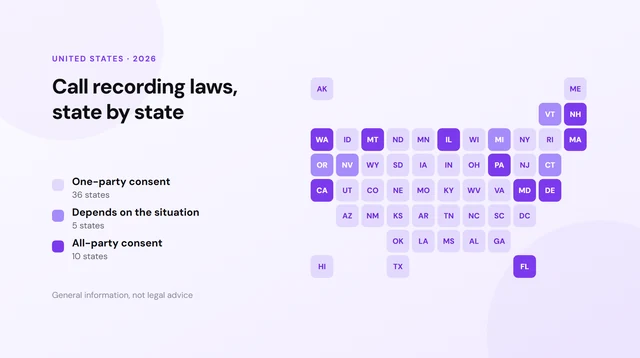
Google’s own help page warns that recording without the consent of everyone on the call may not be legal in some places, and that applies to any recorder. Both Google Voice and Epocra play an announcement by default, which tells everyone on the call. The rules by state, including the ones that require everyone’s consent, are in call recording laws by state. This is general information, not legal advice.
Sources: Google Voice Help: Record calls · Google Voice plans and pricing · Google Workspace blog, 7 July 2026 · Google admin help: AI notes in Voice · Epocra pricing. Checked 14 October 2026. Google Voice and Gemini are trademarks of Google LLC.
Frequently asked questions
Yes, incoming calls only. Turn on Incoming call recording in settings, then press 4 during a call to start and stop. Everyone hears an announcement, and you get the audio without a transcript.
Not on the free plan, which records incoming calls only. Paid plans let you record on demand, and Voice Premier can record every call automatically.
On Voice Standard and Premier, yes. Since mid-2026, tapping Notes during a call gives you a Gemini summary with action items, a transcript and the recording. Free Google Voice transcribes voicemails but not recorded calls.
Voice Standard is $20 a month, currently $10 a month for the first six months, and needs only a Gmail account. Voice Premier, which adds automatic recording, is $30 per user a month for teams on Google Workspace.
Yes. Everyone hears an announcement when recording starts, and with AI notes they hear "This call is being recorded and captured by AI." On business plans an administrator can change the wording; Google documents no setting for users to turn it off.
Only on Voice Premier, where an administrator can set all calls to be recorded. On other plans, someone has to start recording or notes on each call.
Epocra records every incoming and outgoing call from the moment it connects, on the number you already have, and writes the transcript, summary and follow-ups after each call. It starts with a free trial.
More in the Help Center: What gets recorded.
James Ritter
Founder of Epocra. Fifteen years in payments, now building call intelligence for people who run their business from their phone.
Keep reading