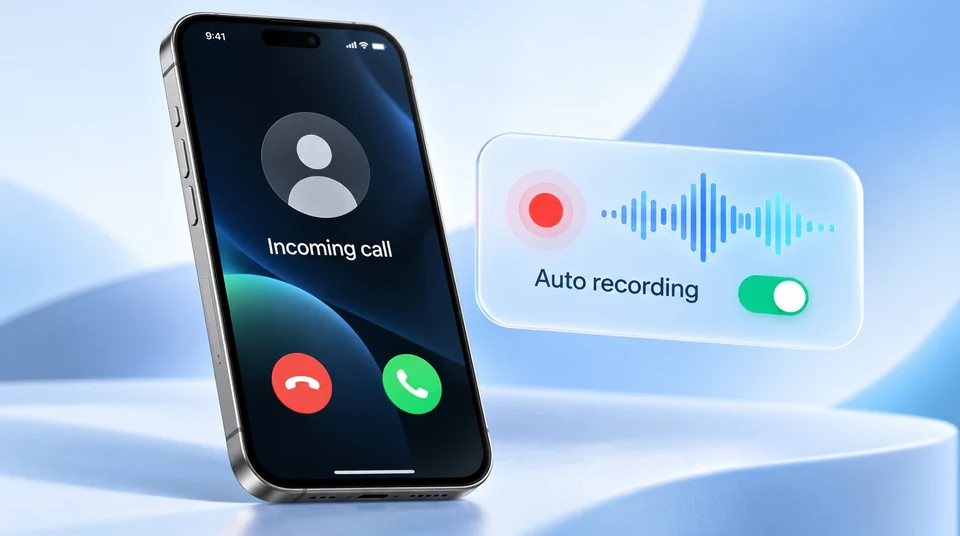
Your iPhone can't do it by itself. Apple's call recorder is manual: you tap Record on each call, after you've answered, and an announcement plays to everyone. There's no setting to make it automatic, and iOS doesn't let apps record calls in the Phone app.
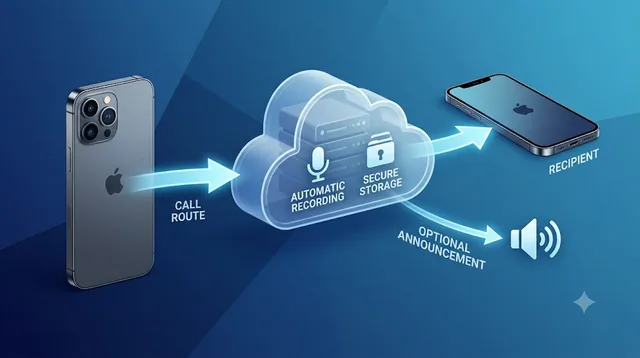
Record the line instead of the phone. Forward your number to a calling service that records every call it carries. With Epocra that's one carrier code: you keep your number, calls ring in the Epocra app, and every incoming call is recorded from the moment it connects, then transcribed and summarised.
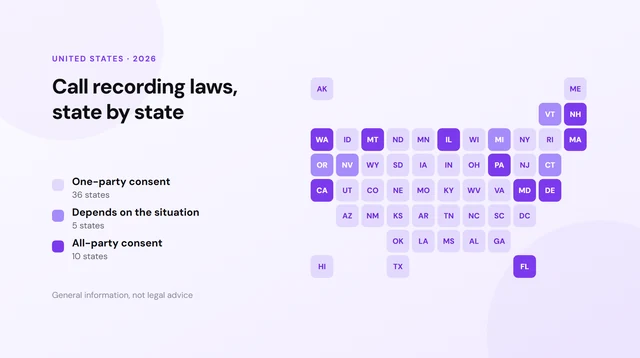
Recording laws vary by state, and some require everyone's consent. By default Epocra plays a short notice when a call is answered, and the rules that apply to your calls are yours to check.
Try Epocra freeSee it in action
See how it works on Epocra
An interactive demo, not a video, of a call being recorded and transcribed. The call ends, and seconds later the recording, transcript and AI summary are waiting, with no button pressed at any point.
- Recording starts at connect, so the opening of the call is kept
- Summary and action items after every call
- Filed to the contact, searchable months later
Why your iPhone can't record calls automatically
Apple added call recording in iOS 18.1, and it was designed from the start as a manual, one-call-at-a-time feature. You answer, you tap Record, an announcement plays to both sides, and recording begins. There's no option to record every call, and no way to have it start on its own when a call connects.
Third-party apps can't fill the gap either. iOS doesn't give apps access to the audio of calls taken in the Phone app, so no App Store app can quietly record your incoming calls in the background. The apps that advertise call recording work around this by pulling a recording line into the call, which you have to set up on each call yourself.
For incoming calls, that manual design costs you twice:
- You lose the start of every call. Recording begins when you tap, and the announcement adds a pause after that. The opening, where the caller says who they are and why they're calling, is never captured.
- You miss the calls that matter. Incoming calls arrive unannounced. The client calling back with a decision or the lender reading out a number is exactly the call you didn't know to record.
How automatic recording works: record the line, not the phone
The way around iOS is to record the call somewhere iOS doesn't control: on the phone line itself. Instead of trying to capture audio on your iPhone, you send your calls through a line that records everything it carries.
That's what forwarding does. Your carrier sends calls for your usual number to your Epocra number, and they ring in the Epocra app. Because the recording happens on the line, it starts the moment the call connects, with nothing to tap, and it captures both sides clearly whether you're on speaker, AirPods or in the car. After the call you get the recording, a transcript and a summary, filed to the contact.
- The opening of the call is kept. Recording is already running when you say hello.
- Nothing to remember. Every call that reaches you is recorded, including the ones you didn't know would matter.
- The notice is yours to set. By default a short announcement plays when the call is answered. You can record your own, or switch it off where the law allows.
- Some calls stay private. Exclude a contact, like your doctor or family, and their calls are never recorded.
Set it up: forward your number with one code
- Find your Epocra number at the top of Settings in the app, or in your welcome email.
- Dial your carrier's forwarding code from the iPhone you want to forward, followed by your Epocra number: *72 then the number on Verizon, or **21*number# on T-Mobile and most other networks (*21*number# on AT&T).
- Test it. Call your own number from another phone. It should ring in the Epocra app rather than your usual dialler.
- That's it. Every incoming call is now recorded automatically. To undo it, dial *73 on Verizon or ##21# on most others, and your phone goes straight back to how it was.
Two things change once forwarding is on: your usual dialler stops ringing, because calls ring in the app instead, and your carrier voicemail stops taking messages, because Epocra answers and transcribes voicemail. Calls you place from the Epocra app are recorded automatically too. Full instructions for every carrier are in the Help Center: Forward your number to Epocra.
Other ways people try, and why they aren't automatic
| Method | How it records | Automatic? |
|---|---|---|
| iPhone built-in recorder | Tap Record after you answer (iOS 18.1+) | No, every call is manual and misses the start |
| Google Voice | Press 4 during an answered call | No, and only for calls to your Google Voice number |
| Merge-call apps (TapeACall style) | Merge a recording line into the call | Not for incoming calls; your carrier must support three-way calling |
| Second device on speaker | Another phone or recorder captures the room | No, and the caller's side is poor quality |
| Forward to a recording line (Epocra) | The line records every call it carries | Yes, from the moment the call connects |
| Incoming calls | iPhone built-in | Epocra |
|---|---|---|
| Starts recording | When you tap, after answering | Automatically, at connect |
| Captures the start of the call | No | Yes |
| Announcement | Always, mid-call | Your setting, at the start |
| Transcript | Apple Intelligence iPhones only | Every call |
| Summary & action items | Per-call summary on supported iPhones | Every call, emailed |
| Organised by contact | No, loose notes | Yes |
| Keeps your number | Yes | Yes, via forwarding |
| Cost | Free | Free trial, then from $24.99/mo |
Every incoming call, on the record
Epocra records, transcribes and summarises every call that reaches you, then emails you the follow-ups.
If you only need the occasional call: Apple's recorder
For a one-off call you know matters in advance, the built-in recorder is free and works well. On iOS 18.1 or later, on an iPhone XR or newer:
- Answer the incoming call as normal.
- Tap More, then Call Recording. (On iOS 18, tap the Record button at the top left of the call screen instead.)
- Wait for the announcement. You and the caller both hear that the call is being recorded, and there's a short pause before capture starts.
- Tap the button again to stop, or just hang up. The recording saves automatically.
Recordings save to the Notes app, in a folder called Call Recordings. iPhones with Apple Intelligence (the iPhone 15 Pro models and the iPhone 16 line) also get a transcript. The announcement can't be switched off; we cover that in detail in iPhone call recording without the announcement, and the full walkthrough is in how to record a phone call on iPhone.
Apple hasn't shipped call recording in the EU. If your iPhone's region is set to an EU country, the Record button won't appear.
Is it legal to record every incoming call?
Usually, yes. In most US states a participant may record a conversation they're part of, and that doesn't change because the other person made the call. A smaller group of states require consent from everyone involved, at least in some circumstances, and when a call crosses state lines the safest approach is to follow the stricter rule.
Recording every call automatically makes this matter more, not less, because it covers calls you didn't plan for. That's why Epocra plays a short notice at the start of each call by default, and why you can exclude contacts whose calls should never be recorded. See call recording laws by state for the detail. This is general information, not legal advice.
Frequently asked questions
Not on its own. Apple's built-in recorder only starts when you tap Record, on each call, after you have answered, and iOS does not let apps record calls taken in the Phone app. To record every incoming call automatically, forward your number to a calling service that records on the line. With Epocra, one carrier code forwards your number and every call that reaches you is recorded from the moment it connects.
Forward your number to Epocra so incoming calls ring in the Epocra app, and place calls from the Epocra app. Both directions are then recorded automatically, with a transcript and summary after every call. Calls you take directly on your carrier line with forwarding switched off are not recorded.
Yes. Callers dial your usual number as before. Forwarding sends the call to Epocra, where it rings in the app. You keep your number and your carrier, and one code switches forwarding off again.
By default, yes: Epocra plays a short announcement when the call is answered. You can replace it with your own, or switch it off where the law allows. Whether you may switch it off depends on the consent rules that apply to your calls.
Yes. You can exclude specific contacts, or a whole contact type such as Personal, so their calls are never recorded. You can also stop the recording part-way through a call.
On iOS 18.1 or later, on an iPhone XR or newer, answer the call, then tap More and Call Recording (on iOS 18, the Record button at the top left of the call screen). Everyone on the call hears an announcement, and the recording saves to the Notes app. Recording starts from the moment you tap, not from when you answered.
On a personal Google Voice account, no. Once incoming call options are switched on in settings, you press 4 during each answered call to record it, both sides hear an announcement, and it only works for calls to your Google Voice number.
More in the Help Center: What gets recorded.
James Ritter
Founder of Epocra. Fifteen years in payments, now building call intelligence for people who run their business from their phone.
Sources: Apple Support: Record and transcribe a call · Google Voice Help · Epocra Help: forwarding codes. Checked September 2026.
Keep reading