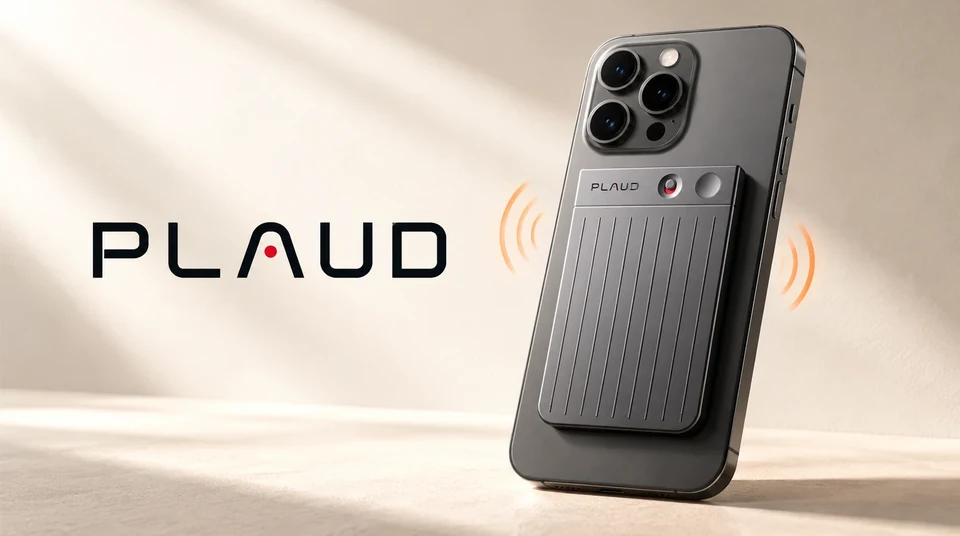
Plaud records phone calls through vibration. The Plaud Note and the Plaud Note Pro contain a Vibration Conduction Sensor. Stuck to the back of your phone, it feels the phone’s speaker vibrating and turns that into audio, which is how it captures both sides of a call without any app touching the call itself. The NotePin and NotePin S do not have the sensor and cannot record calls. The method has real conditions attached: the device must be on the phone, the phone must be at your ear or on speaker, a thick case can block it, earbuds and headphones are not supported, and you start each recording by hand. Plaud’s own earbuds, the Plaud One, are the exception: announced in August 2026 and shipping later in the year, they record calls through microphones in the earbuds themselves.
Record the call on the line instead of through the glass. Epocra is a calling app, so the call runs through its own line and is recorded there. Every incoming and outgoing call, automatically, with earbuds or in the car, and a few minutes later you have the transcript by speaker, a summary and the follow-ups as tasks. No device to attach, no button, no mode.
Disclosure: we make Epocra. Everything said about Plaud below comes from Plaud’s own help center and product pages, checked on 8 October 2026.
See it in action
A phone call that records itself
An interactive demo, not a video. A call ends, and a few minutes later the recording, the transcript and the summary are waiting. Nothing was attached to the phone.
- Records from the moment it connects — incoming and outgoing, with earbuds or without
- Transcript by speaker, then a summary — with the action items pulled out
- Keeps your number — through one call-forwarding code from your carrier
How the vibration sensor works
Phones do not hand call audio to other apps. Apple and Google both lock it away, which is why most AI note takers simply cannot hear a phone call. Plaud’s answer was to stop asking the phone for the audio and take it from the outside instead.
When you hold a phone to your ear, the earpiece speaker makes the body of the phone vibrate very slightly with the other person’s voice. The Plaud Note and Note Pro have a Vibration Conduction Sensor pressed against the back of the phone that reads those vibrations, while the device’s microphones pick up your own voice through the air. Plaud’s help center puts it plainly:
“The Plaud Note needs to be attached to the back of your phone because the internal vibration conduction sensor needs to pick up sound directly from the phone’s speaker itself.”
Plaud help center, “What is the difference between Note Recording and Phone Call Recording?”
It is a clever piece of engineering and it genuinely works, on any phone, with any calling app, including WhatsApp calls according to Plaud. It also explains every one of the conditions below, because a sensor that listens to the phone’s body only works when the phone’s body is doing the talking.
Which Plaud devices can record calls
| Device | Price | Records phone calls? | How |
|---|---|---|---|
| Plaud Note | $159 | Yes | Slide the switch to Phone Call mode, attach it to the back of the phone, long-press to record |
| Plaud Note Pro | $189 | Yes | Same sensor; switches between in-person and call mode on its own using an orientation sensor |
| Plaud NotePin | see plaud.ai | No | No vibration sensor. “Records in-person conversations only” |
| Plaud NotePin S | $179 | No | No vibration sensor. Plaud’s suggested workaround is speakerphone |
| Plaud One (earbuds) | about $249 | Announced | Earbuds record calls through their own microphones; announced August 2026, shipping later in the year |
Scroll the table sideways on a phone.
So the honest answer to “can Plaud record phone calls” is: two of the four current devices can, and the two wearable ones cannot. If you bought a NotePin for calls, that is why it is not working. Plaud’s help center answer for the NotePin S is to put the phone on speaker and let the pin pick the call up through the air, which records both sides but turns every call into a speakerphone call.
What it means on an actual call
Everything in this section is from Plaud’s help center, and all of it follows from the sensor needing the phone’s body to vibrate.
The device has to be on the phone
Attached to the back, with the magnetic case or ring, for the whole call. Plaud’s support page for the Note Pro notes that if a phone call interrupts an in-person recording while the device is attached, it records both at once and the transcription quality may suffer.
No earbuds, no headphones, no car
If the other person’s voice comes out of your AirPods or your car speakers, the phone’s body is not vibrating, so the sensor has nothing to read. Plaud says it directly: “Using earbuds or headphones, including AirPods, is not supported while recording a call,” and for the Note Pro, “with earphones in, Plaud Note Pro can’t pick up the other party’s voice during a call.” For most people who live on the phone, earbuds and the car are where the calls happen. Plaud knows this, which is presumably why its next product is a pair of earbuds. The Plaud One, announced in August 2026 at about $249 and shipping later in the year, records calls through its own microphones rather than through the phone. It is on preorder, so nothing here is tested, but it is the first Plaud device that would work with the phone in your pocket.
You start every recording yourself
Plaud’s help center is unambiguous that the Note does not record calls automatically, and explains why: “Phone operating systems limit the app’s ability to stay active 24/7 to monitor call events. Therefore, please attach the Plaud Note to the back of your phone and press the Record button to record calls.” The Note Pro improves one step of this: it picks the right mode on its own, using an orientation sensor to tell whether it is standing in a call or lying flat in a meeting. Starting the recording is still a long-press on the device. The call that comes in while you are driving, or the one you answer before you remember the device, is not recorded.
One mode per file
A phone call and an in-person conversation cannot share a recording. If the slider is in the wrong position when you press record, the file is in the wrong mode and you stop and start again.
What the recordings sound like
Reading a voice off a vibrating phone body is harder than pointing a microphone at it, and the recordings show it. Plaud’s own troubleshooting page for the Note Pro opens with the symptoms it expects to hear about:
“Phone-call recordings are hard to hear. In a phone-call recording, you can only hear your own voice and not the other party. Phone-call recordings sound too loud and distorted.”
Plaud help center, “Low volume or poor sound quality on Plaud Note Pro”
The fixes on the same page tell you what the sensor needs in order to work: set the call volume to at least 80 percent, remove earphones, attach the device firmly, take the Magnetic Case off if the sound is muffled, and “if your case is thick, remove it and try again (thick cases may reduce audio pickup).” If you use speakerphone, take the device off the phone, because stuck to the back it “picks up the call twice” and comes out distorted. Plaud also suggests turning off AI Speech Enhancement and testing again.
Independent testing lines up with that. In its Plaud Note review, Tom’s Guide found the default sensitivity “not strong enough” to pick up a quiet caller: the voices were audible in the recording but “weren’t loud enough for GPT-4o to recognise and transcribe them.” The reviewer recommends turning the sensor sensitivity to maximum for any call where the other person is quiet or the room is noisy, and reports that the after-the-fact AI enhancement “didn’t manage to boost whispered voices at all and even proved destructive to full-volume speech.” The same review notes the Note could drop off the phone through a case, and recommends taking the case off.
So the realistic picture is a recording where your side is clear, the other side depends on your phone’s volume, your case and how firmly the device is seated, and the transcript is only as good as the quieter of the two voices. For a quick memo of a call it is fine. For a transcript you will rely on, it takes some care.
What it costs
The device is a one-time purchase: $159 for the Note, $189 for the Note Pro. Transcription and summaries are a separate plan. The free Starter plan includes 300 minutes of transcription a month; past that you move to a paid plan whose price Plaud shows in the app. For someone who makes a lot of calls, 300 minutes is about ten hours, which is a busy week or two, so the realistic cost is the device plus the subscription.
Plaud, Apple and Epocra side by side
| Plaud Note / Note Pro | Apple’s built-in recorder | Epocra | |
|---|---|---|---|
| How it records | Vibration sensor on the back of the phone | Inside iOS, during the call | On Epocra’s own line, the call runs through it |
| Starts | Long-press on the device, every call | Tap during the call, every call | Automatically, every call, both directions |
| Earbuds or car audio | Not supported | Works | Works |
| Incoming calls you did not expect | Only if the device is on and you press record | Only if you remember to tap | Recorded |
| Announcement | None from the device | Both parties hear it, cannot be turned off | On by default, you control it in settings |
| Afterwards | Transcript and summary in the Plaud app | Audio in Notes; transcript on newer iPhones | Transcript by speaker, summary, tasks, in the app and your inbox |
| Cost | $159 to $189 plus a plan past 300 minutes a month | Free with iOS 18.1 and later | Free trial, then from $24.99 a month |
Scroll the table sideways on a phone.
Plaud wins if you want one device for meetings, lectures and the occasional call, and you take those calls with the phone at your ear. Apple wins if you record a call now and then and do not mind the announcement. The rest of the iPhone options are in the roundup of iPhone call recording apps.
How Epocra does it
Epocra does not try to listen to your phone from the outside. It is the phone. You get a business number in the app and use it as your dialer, and because the call runs through Epocra’s own line, the recording happens on that line. There is nothing to attach, nothing to press and no mode to pick.
- Every call, both directions. Incoming and outgoing calls are recorded from the moment they connect, including the ones you did not see coming.
- Earbuds, car, speaker, handset. The recording does not depend on how you hold the phone, because it is not made by the phone.
- Transcript, summary and tasks. A few minutes after you hang up: the transcript by speaker, a summary with the key points and next steps, and every commitment pulled out as a task. In the app, on your desktop and in your inbox.
- Ask across every call. “What did she say about the inspection?” gets an answer from the actual conversation.
- Your number stays yours. Calls go out showing the cell number you verified.
- The recording notice is yours to set. On by default, controlled in settings, within the consent law where you and the other party are.
Epocra starts with a free trial and then costs from $24.99 a month. The Android app is on Google Play; the iPhone app is in Apple review. If your question is really “which AI note taker can hear my calls at all,” that comparison is in AI note taker for phone calls.
A word on consent
The method does not change the law. Most US states allow a call to be recorded when one person on it knows, and that person can be you. A smaller group of states requires everyone on the call to agree. Which rule applies depends on where you and the other person are, and it is the same rule whether the recording came from a sensor on the back of your phone, from Apple, or from Epocra. The state-by-state detail is in call recording laws by state. This is general information and not legal advice.
Sources: Plaud: Note Recording vs Phone Call Recording · Plaud: automatic call recording · Plaud: headphones during a call · Plaud: Note Pro auto-switching · Plaud: NotePin S and phone calls · Plaud: low volume or poor sound quality on Note Pro · Tom’s Guide: Plaud Note review · Plaud Note Pro · TechCrunch on the Plaud One · Epocra pricing. Plaud’s wording and prices checked 8 October 2026. Plaud is a trademark of its owner and is named here for comparison only.
Frequently asked questions
The Plaud Note and Plaud Note Pro can. They use a Vibration Conduction Sensor pressed against the back of the phone to pick up the speaker, capturing both sides of the call. The NotePin and NotePin S do not have the sensor and cannot record calls.
No. Plaud’s help center says the NotePin “records in-person conversations only and does not support phone call recording,” and the NotePin S has no vibration sensor. Plaud’s suggested workaround for the NotePin S is to put the phone on speaker.
No. Plaud’s help center says the Plaud Note does not support automatic call recording because phone operating systems do not let the app watch for calls, so you attach the device and press record for each call. The Note Pro picks the recording mode by itself but a recording is still started by hand.
No. The sensor reads the phone’s own speaker, so if the other person’s voice comes out of earbuds, headphones or car speakers there is nothing for it to pick up. Plaud states this for both the Note and the Note Pro.
Yes, according to Plaud, the same way as a regular call: device attached to the back of the phone, Phone Call mode on, no earbuds or headphones.
Because the sensor reads your phone’s speaker through the body of the phone. Plaud’s troubleshooting page says to set call volume to at least 80 percent, remove earphones, attach the device firmly, remove a thick case, and turn off AI Speech Enhancement. Tom’s Guide found the default sensitivity too low to transcribe a quiet caller and recommends setting it to maximum.
The Plaud Note is $159 and the Note Pro is $189 as of October 2026. Transcription uses a plan: 300 minutes a month free on the Starter plan, then a paid plan priced in the app.
A calling app that records on its own line. Epocra records every incoming and outgoing call from the moment it connects, works with earbuds and in the car, and delivers the transcript, a summary and the follow-ups as tasks a few minutes after you hang up. It starts with a free trial.
More in the Help Center: What gets recorded.
James Ritter
Founder of Epocra. Fifteen years in payments, now building call intelligence for people who run their business from their phone.
Keep reading