Your Galaxy does not have a call recorder, and there is no setting that will give it one. The feature was left out of the software Samsung ships to the United States, so there is nothing hidden to switch on and nothing to restore. Samsung does build a recorder into the Phone app — which is why you will find support articles describing it step by step — but those pages were written for handsets sold in other countries.
Every method that records a call on the handset depends on the manufacturer or the operating system allowing it, and in the United States neither does. Recording on the line does not have that problem.
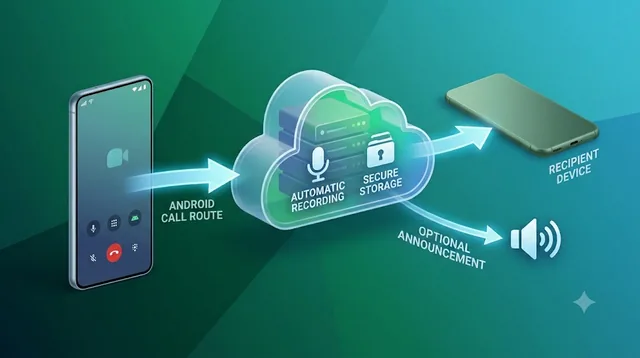
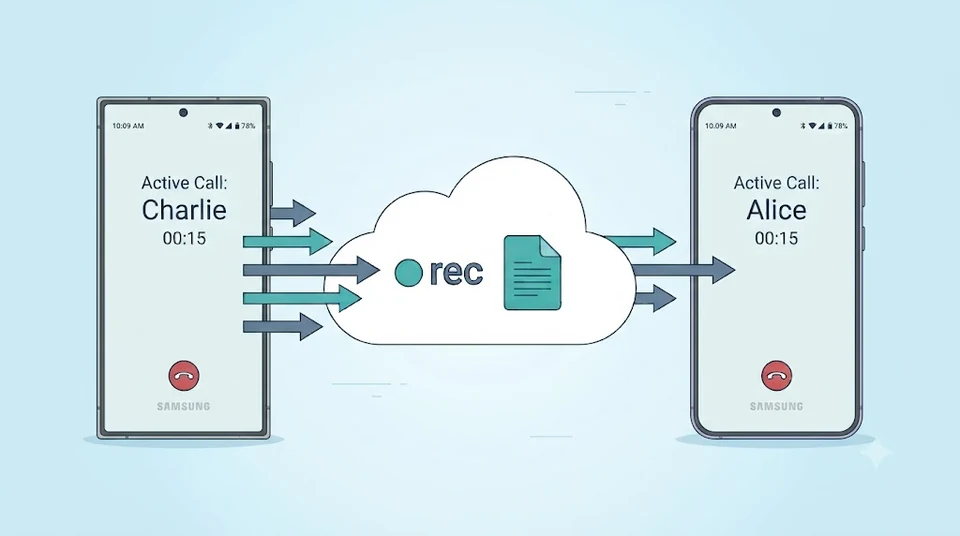
Calls made and received through Epocra run over its own network, so the recording happens there rather than on the phone. It works the same on a Galaxy S25 as on a five-year-old A-series or an iPhone, nothing has to be enabled in Samsung’s settings, and whether a notice plays is an account setting you match to the consent your state requires.
See it in action
Recording that does not depend on your handset
Tap through the real app. No Phone-app setting was switched on and no region check applies — the call is captured on the line, and the write-up lands in the inbox once it ends.
- Works on any Galaxy — no setting to hunt for, no region lock, no root
- Both sides at full quality — captured on the line, not through a speakerphone
- The notice is your setting — switch it on or off to match the law where you are
See for yourself in fifteen seconds
You should not have to take anyone’s word for this, and the setting lives somewhere most people never think to look: inside the Phone app, not the main Settings app. That alone accounts for a lot of the confusion.
Open the Phone app, tap the three dots in the corner, then Settings. That list is where Record calls sits on a handset that has it, usually alongside an option to record automatically. The wording shifts a little between software versions — some builds say Recording calls and bury the auto-record switch a level deeper — but it belongs to the Phone app either way.
On a US model there is no such entry. Nothing in Developer options, nothing under Accessibility, nothing behind a hidden dialler code will produce one, because the code is not in your build. What you are looking at is the absence itself.
If you do find it, your Galaxy was almost certainly sold outside the United States — an import or a grey-market unlock. The same applies to the instructions you will find on Samsung’s own site: check the country code in the URL, and if it is anything other than /us/, it is describing a phone you do not own.
Why US models ship without it
This is not a technical limitation, and Samsung has not taken anything away from American customers that they previously had. It is a decision about liability.
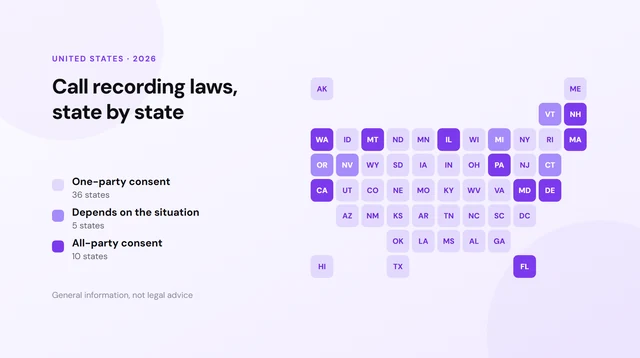
Recording law in the United States is not one rule. Federal law and most states require only one participant to consent, and you are that participant. But a significant group of states — California, Florida, Illinois, Pennsylvania, Washington and several more — require everyone on the call to agree. A one-tap recorder built into the dialler, shipping to every state at once, hands millions of people a button whose legality depends on where they and the person they called happen to be sitting.
Manufacturers have consistently chosen not to take that on. Apple came at the same problem from the other direction: iOS does have call recording, and it announces itself out loud to both parties so consent is never ambiguous, with no way to switch the announcement off. Google restricts recording in its Phone app by region and plays a notice where it is allowed. Samsung’s answer was to leave the feature out of the American build entirely.
The practical consequence for you is the same in every case. The phone in your hand will not do this, and the reason has nothing to do with your phone’s capabilities.
Why the recorder apps stopped working
The obvious next move is the Play Store, and this is where most people lose an afternoon. Search for a call recorder and you will find dozens of apps, many with millions of downloads and a wall of recent one-star reviews saying the same thing: it records silence, or only my voice.
Those apps were never recording the call directly. They worked by abusing the Accessibility API, a system built for screen readers, to reach audio Android does not otherwise expose. In 2022 Google closed that route. Apps that depended on it did not get an update; they simply stopped capturing the other person, usually without saying so. The listings are still there, and the download counts still look reassuring.
You will also see suggestions involving rooting the phone, custom ROMs, or sideloading an older version of an app. Those either fail on current Samsung software, break your warranty and banking apps, or both. The wider Android picture is worth reading if you want the full account of what changed.
The speakerphone workaround
There is one approach on the handset that does produce audio: put the call on speaker and record the room, either with Samsung’s Voice Recorder app or a second device. Both voices end up in the file.
| What you get | What it costs you |
|---|---|
| Both sides of the conversation | Room audio: echo, background noise, and the other person sounding thin and distant |
| No extra software or subscription | Everyone nearby hears the call, so it is useless in an office, a shared car, or anywhere public |
| Works on any Galaxy | You must set it up before the call starts, every single time |
| Nothing announces it | Transcription of room audio is markedly worse, and your legal obligations have not changed at all |
Some people try screen recording instead, on the theory that it captures whatever the phone is playing. It does not — Android excludes the call stream from screen capture for the same reasons discussed above, so you get a video of the call screen and no conversation. That is covered in detail here.
Does any Galaxy in the US have it?
Not in the way people hope. The question usually arrives attached to a model number — whether the S24 does it, whether the S25 fixed it, whether a Fold is different — and the answer does not vary by model, because it was never about the hardware. An S25 Ultra and a budget A-series bought from the same US carrier have the same gap, while a mid-range Galaxy sold overseas has the feature your flagship does not.
Two things do genuinely change the answer, and neither is a purchase:
An unlocked import
A handset bought in a region where the feature ships may retain it after you bring it to the United States, since the behaviour follows the firmware rather than the SIM. This is not a recommendation — you inherit that region’s update channel and band support — but it explains why you may have watched someone use a feature you cannot find.
A carrier or business phone system
Recording that happens on the network instead of the handset has never been subject to any of this, which is why call centres have recorded calls for decades. That is the same mechanism described below, and the only one that works consistently in the US.
What actually records a call
Everything above fails for one shared reason: it tries to capture the call from inside a device whose manufacturer has decided it should not be captured. Recording on the line sidesteps the argument entirely. The audio exists in full where the call is carried, and no handset setting governs it.
This is not a novel trick, and it is worth knowing that, because the workarounds above can make call recording feel faintly disreputable. It is how business telephony has worked for decades. Dialpad, RingCentral, Aircall, Zoom Phone and every call centre platform record on the network rather than on the handset — it is why a support line can tell you the call may be recorded regardless of what phone the agent happens to be holding, and why none of them care whether that agent uses a Galaxy or an iPhone.
Epocra applies the same approach to an ordinary mobile number. Calls made and received through Epocra run over its own network and are recorded there, so a nine-year-old Galaxy and a brand-new Ultra behave identically, and there is nothing to enable, remember, or root.
What arrives afterwards is the part people actually use. Not a long audio file to scrub through, but an email waiting when you hang up: who called, how long it ran, a short account of what was discussed, the action items, the key takeaways, and a link to the full transcript when you need the exact words.
Your phone is not the problem
Epocra records on the line, not on the handset — every call, on any Galaxy, with a summary in your inbox when you hang up.
See pricingIs it legal?
Recording a call you are part of is legal across the United States provided the consent requirement where you are is satisfied. Federal law and most states ask for one party to agree, and you are that party. A meaningful minority require everyone on the call to agree.
Two details catch people out. Calls that cross state lines can pull in the stricter state’s rule, and the method is irrelevant to the question — a Samsung feature, a second phone on the table, or a recording service are all judged on whether the required consent was obtained. That is the same calculation Samsung made when it decided not to ship the feature here.
The state-by-state breakdown is in call recording laws by state. This is general information rather than legal advice; if a recording is going to matter, ask someone qualified about your situation.
Frequently asked questions
Because the feature is not included in the software Samsung ships to the United States. It exists on Samsung phones sold in several other regions, but US carrier models are built without it. There is no hidden setting to enable.
Open the Phone app, tap the three dots, then Settings, and look for Record calls. If that entry is absent, your handset does not have the feature and no setting elsewhere will add it.
Not on a US model. The answer does not change with the model or the price, because it was never a hardware limitation - an S25 Ultra and a budget A-series sold by the same US carrier both lack it.
Mostly no. They relied on the Accessibility API to reach call audio, and Google closed that route in 2022. Many still install and appear to run while capturing only your side of the conversation, or silence.
No. Android excludes the call audio stream from screen capture, so you get video of the screen with no conversation on it.
A service that records on the line rather than on the handset. Because the recording is made on the network, it is unaffected by which Galaxy you own or which region it was sold in, which is how Epocra records every call automatically.
More in the Help Center: Forward your number to Epocra.
James Ritter
Founder of Epocra. Fifteen years in payments, now building call intelligence for people who run their business from their phone.
Sources: Apple Support — Record and transcribe a call · MacRumors · Tom's Guide. Device support and regional availability verified July 2026.
Keep reading