iPhone, Google Pixel and Samsung Galaxy phones can all summarize a call, but none of them does it for every call on its own. On iPhone (15 Pro or newer) and Samsung (One UI 7 or newer) you tap record during each call, then ask for the summary afterwards. Pixel 9 and newer come closest: Call Notes can switch on by itself for numbers you pick and for callers who are not in your contacts. Everyone on the call hears a notice on all three.
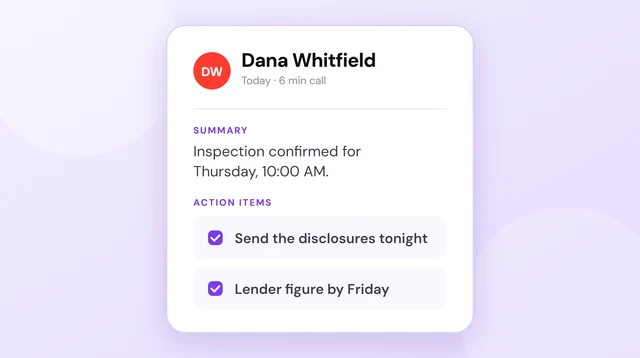
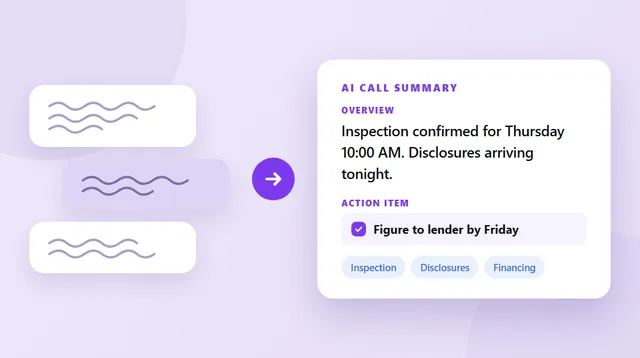
Epocra summarizes every call on your number, on any iPhone or Android. Incoming and outgoing calls are recorded from the moment they connect, and the summary and follow-ups arrive a few minutes after you hang up, with nothing to tap.
Disclosure: we make Epocra. Everything said about iPhone, Pixel and Samsung comes from Apple, Google and Samsung’s own help pages, checked on 16 October 2026.
See it in action
A summary after every call
An interactive demo, not a video. Take a call and watch the summary and follow-ups appear on their own once you hang up.
- Every call: incoming and outgoing, nothing to tap
- iPhone and Android: any model, the same account on both
- Summary and action items: written for you after every call
The three phones side by side
| Phone | Which models | Starts on its own? | Where the summary goes |
|---|---|---|---|
 iPhone iPhone | iPhone 15 Pro, 15 Pro Max, and iPhone 16 or newer | No. Tap record on each call | Notes app, tap Summary |
 Google Pixel Google Pixel | Pixel 9 and newer, not the A series | Partly. Chosen numbers and non-contacts | Phone app call log |
 Samsung Galaxy Samsung Galaxy | One UI 7 or newer, not Galaxy A56, A36, A26 or A17 | No. Tap record on each call | Phone app, tap Summarize |
 Epocra Epocra | Any iPhone or Android | Yes, every call | Epocra app, after every call |
On a phone, swipe the table sideways.
iPhone
Since iOS 18.1 the iPhone can record a call, and with Apple Intelligence it can summarize it. Apple Intelligence needs an iPhone 15 Pro, 15 Pro Max, or any iPhone 16 or newer. Older iPhones can still record a call and get a transcript, but no summary.
- During the call, tap the More button, then Call Recording. Both of you hear a notice that the call is being recorded.
- Hang up. The recording is saved to a Call Recordings folder in the Notes app.
- Open it in Notes, tap the recording, then tap Summary.
There is no setting to record every call, so nothing is summarized unless you remember to tap record while you are talking. It only works with one other person on the line, and call recording is not available in the European Union and a list of other countries.
Google Pixel
Pixel’s version is called Call Notes. It runs on the phone itself, keeps the recording, transcript and summary on the device, and puts the summary in your call log with the main points, any dates and places mentioned, and next steps. On the Pixel 10 it can also suggest a calendar event or reminder from the call.
It is the only one of the three that can start without a tap. In the Phone app settings you can choose numbers that always get Call Notes, adding contacts one at a time, and switch it on automatically for calls from numbers that are not in your contacts. Calls with everyone else still need a tap.
The limits are tight: Pixel 9 or newer (not the A series), a SIM from a supported country, and summaries in English only. In the US, UK, Canada, Australia and Ireland it works in English. The other people on the call are told when Call Notes switches on. More detail is in call notes on any phone.
Samsung Galaxy
Galaxy phones on One UI 7 or newer can record calls in the Samsung Phone app, and Galaxy AI’s Transcript assist turns the recording into a transcript and a summary. To set it up, open the Phone app settings, then Record calls, then Transcript assist, and turn on Summarize transcripts and Auto transcribe recorded calls.
You still tap Record during each call, and everyone on the call hears a notice. After the call, open it in Recents, tap View recording and transcript, then tap Summarize. Transcript assist needs a Samsung account and an internet connection, and the Galaxy A56, A36, A26 and A17 do not get transcripts or summaries. Samsung says its basic Galaxy AI features are free. US call recording arrived with One UI 7, so a phone still on an older update, or a carrier model that has not received it yet, will not show the Record button.
Other Android phones
As of October 2026 we could not find a built-in call summary on other Android phones sold in the US, such as Motorola or OnePlus. OnePlus has an AI call assistant that summarizes calls, but it launched in India, not the US. If your phone is not a Pixel 9 or a recent Galaxy, the built-in route is closed and you need an app.
The calls that never get summarized
All three phones share the same weakness: the summary depends on someone deciding, during the call, that this one is worth recording. The call that seemed routine and turned out to matter is the one nobody tapped record on. Pixel’s automatic options help for unknown callers, but the clients and colleagues already in your contacts still need a tap each time.
“Automatically” on a phone means “after you tap record”. The summary is automatic; the recording is not.
The summaries also stay on that one phone, in Notes or the call log. Switch from iPhone to Android, or the other way round, and the feature, and the history, does not come with you.
Every call, any phone
Epocra is a calling app for your normal number. Calls you make in Epocra go out over its own line, and calls to your number reach it through one carrier code, so every incoming and outgoing call is recorded from the moment it connects, with nothing to tap. People see your own number either way.
After each call you get the recording, the transcript with each speaker labelled, a summary and the follow-ups as tasks, and you can ask questions across every call you have had. It works the same on any iPhone or Android, so the history follows you if you change phones. Out of the box, a brief notice plays to the other person when the call starts, and you can turn it off in Settings where the law for both of you permits. The rules are in call recording laws by state. Epocra starts with a free trial, then $24.99 a month.
Sources: Apple: record and transcribe a call · Google: use Call Notes · Google: Pixel 10 calling updates · Samsung: record phone calls · Android Authority on OnePlus. Checked 16 October 2026. iPhone, Pixel and Galaxy are trademarks of their owners.
Frequently asked questions
iPhone 15 Pro and newer, Pixel 9 and newer, and Samsung Galaxy phones on One UI 7 or newer can all summarize a recorded call. Only Pixel can start recording on its own, for numbers you choose and for callers not in your contacts.
Yes, with Apple Intelligence on an iPhone 15 Pro, 15 Pro Max or any iPhone 16 or newer. You tap record during the call, then open the recording in Notes and tap Summary.
No. You start recording during each call, and it only works with one other person on the line. Both of you hear a notice.
It can, for numbers you add to an always list and for calls from numbers that are not in your contacts. Other calls need a tap. It needs a Pixel 9 or newer, not the A series.
Yes. On One UI 7 or newer, Transcript assist turns a recorded call into a transcript and summary. You tap Record during the call, and it is not on the Galaxy A56, A36, A26 or A17.
Yes, on all three phones everyone on the call hears a notice when recording starts.
Epocra records incoming and outgoing calls on your normal number from the moment they connect, on any iPhone or Android, and writes the summary and follow-ups after each call.
More in the Help Center: What gets recorded.
James Ritter
Founder of Epocra. Fifteen years in payments, now building call intelligence for people who run their business from their phone.
Keep reading