Yes on many Android phones, but not the way it used to. Google Play no longer lets Cube ACR switch on the accessibility connector it used to identify the caller and record the other person’s voice. On Android 9 and later, Cube’s own guide tells you to install a separate Cube ACR Helper app from outside Google Play to get that back. Even then, Cube says its workaround does not capture the other side of calls taken on a headset or Bluetooth, and some phones only record your voice until you change the recording settings. On iPhone, Cube ACR is a different app that records by merging a service number into a three-way call.
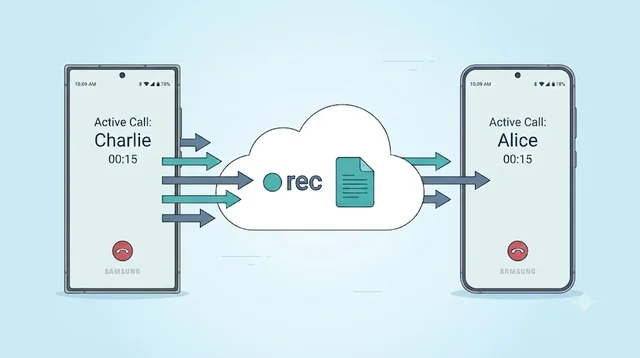
Record on the line instead of on the handset. Epocra is a calling app, so the call runs through its own line and both sides are recorded there from the moment it connects. There is no Helper to sideload, no audio source to tune, and it works the same on a headset, an Android phone or an iPhone. A few minutes after you hang up you have the transcript, a summary and the follow-ups as tasks.
Disclosure: we make Epocra. Everything said about Cube ACR below comes from its own Google Play and App Store listings, website and FAQ, checked on 13 October 2026.
See it in action
Recording that does not depend on your phone
An interactive demo, not a video. The call is captured on the line, so nothing on the handset has to be enabled, and the write-up is waiting once it ends.
- Both sides at full quality: captured on the line, headset or not
- Nothing to sideload: no Helper app, no accessibility settings
- Summary and action items: written for you after every call
Cube ACR at a glance
Cube ACR is really two products that share a name. The Android app records the call on the phone itself. The iPhone app cannot do that, because iOS does not let any app hear a call, so it records through a conference line instead. The table puts both next to Epocra, which records in a third way.
| Cube ACR on Android | Cube ACR on iPhone | Epocra | |
|---|---|---|---|
| How it records | On the phone, using Android’s audio and accessibility features | Merges a service number into the call as a three-way call | The call runs through Epocra’s own line, which records it |
| Automatic | Yes, incoming and outgoing, once set up | No. You call the service number and merge it each time | Yes, incoming and outgoing |
| Extra setup | Android 9 and later: a Helper app installed from outside Google Play | Your carrier must support three-way calling | One call-forwarding code for incoming calls |
| Headset and Bluetooth calls | Cube says its workaround does not record the other side | Not stated | Recorded the same as any other call |
| WhatsApp and other VoIP apps | Yes, on phones whose hardware allows it | Not listed | No. Records calls made in Epocra |
| After the call | The recording, stored on the phone, with optional cloud backup | The recording and a transcript | Recording, transcript by speaker, summary and tasks |
| Price | Free with ads, plus in-app purchases | $7.99 a week, $34.99 for six months or $49.99 a year | Free trial, then from $24.99 a month |
| Ratings | 4.1 from 912K reviews, 50M+ downloads | 4.5 from 1.3K ratings | On Google Play since October 2026 |
On a phone, swipe the table sideways.
Why Cube ACR needs a Helper app now
Android has been closing the doors call recorders use for years. Google removed the official way for apps to record calls in Android 6, then stopped apps recording call audio through the microphone in Android 10. What was left was the Accessibility API, a set of permissions meant for apps that help people with disabilities, which recorders like Cube used to reach the call audio and see who was calling.
In May 2022 Google closed that too. Its Play policy now says the Accessibility API “is not designed for and cannot be requested for remote call audio recording.” Apps on Google Play had to stop asking for it.
Cube’s answer is in its own installation guide. The Google Play version of the app, it says, can no longer ask you to turn on the Cube ACR app connector in your accessibility settings, and that connector was what let it identify the caller on Android 9 and later, record the other person’s voice on Android 10 and later, and record VoIP calls on any version. To get those back you install a second app, Cube ACR Helper, which is not on Google Play. Cube offers it through the Galaxy Store, Huawei AppGallery, the Amazon Appstore, Aptoide, or as a file to download from its website.
The Helper is not a replacement for Cube ACR. It is a connector that gives the app back the permission Google Play took away, which is why you need both installed.
Setting up the Helper, step by step
This follows Cube’s own guide. The exact menu names vary a little between phone makers.
- Install Call Recorder - Cube ACR from Google Play.
- Install Cube ACR Helper from one of the stores above, or download the file from cubeacr.app. If you use the file, your phone will ask you to allow installs from that source.
- Open the Helper and grant every permission it asks for.
- When it reaches Enable App Connector, open Downloaded apps or Installed services and switch on Use Cube ACR app connector.
- On Android 13 and later the switch may be greyed out with a “Restricted settings” message. Go to Settings > Apps > Cube ACR Helper, tap the three-dot menu, choose Allow restricted settings, then go back and turn the connector on.
Two things are worth knowing before you do it. Installing an app from outside Google Play means it has not been through Google’s review, so only take it from Cube’s own site or one of the stores it names. And the Restricted settings step exists because Android treats a sideloaded app asking for accessibility access as a risk; you are deliberately overriding that warning.
When you only hear yourself
The most common complaint about Android call recorders is a recording with one side missing. Cube’s Play listing mentions it directly, and its FAQ has a list of things to try, roughly in this order:
- Check the connector. Make sure Cube is up to date and the App Connector is switched on in accessibility settings.
- Change the recording source. For Android 10 and later Cube suggests “voice recognition (software)” with the recording clarity turned up and “force in-communication mode” on. If that fails, try “voice call (software)”.
- Remove the competition. Another call recorder, including one built into the phone, a voice assistant such as Google Assistant or Bixby, or WiFi calling can stop the recording. Cube suggests switching them off to test.
- Use the speaker. The listing suggests auto-on speaker mode, which lets the microphone pick up the other person from the loudspeaker.
One case has no fix. Cube’s FAQ says the workaround it uses on Android 9 to 14 “will not work for calls using a headset”. If you take calls on earbuds or in the car over Bluetooth, expect those recordings to have only your side.
Cube ACR on iPhone is a different app
On iPhone there is no way for an app to reach the audio of a call made in the Phone app, so Cube does what every iPhone call recorder in the App Store does: it records through a conference. In the developer’s own words, you call the service number before or during your conversation and merge the calls together. The App Store listing adds that your carrier has to support three-way calls.
That makes it a close cousin of TapeACall, which works the same way and is compared in detail in Epocra vs TapeACall. The iPhone version lists a transcript of each recording, cloud backup and a Face ID lock. It costs $7.99 a week, $34.99 for six months or $49.99 a year, according to its App Store listing. It has 1,300 ratings rather than the Android app’s 912,000, so most of what you read about Cube ACR online is about the Android app.
Where Cube ACR is still a good pick
- You are on Android and want it free. The core recorder costs nothing if you can live with ads.
- You record WhatsApp, Viber or other app calls. Cube records VoIP apps on phones whose hardware allows it, which most recorders do not try.
- You do not mind some setup. If you are comfortable installing the Helper and testing a few audio settings, it still works on a lot of phones.
- You want the files on your phone. Recordings stay on the device, with cloud backup if you choose it.
Where it falls short
- It depends on a workaround. The Android app relies on a permission Google Play no longer allows, restored through an app installed from elsewhere. Cube still documents it as the fix, but it sits on the route Google has spent a decade closing.
- Headset calls lose the other side, by Cube’s own account.
- Results vary by phone. Whether you get both sides can come down to the model, the Android version and the audio source you pick.
- Deleted recordings are gone. Cube’s FAQ says it keeps no copy, so without a backup a lost phone means lost calls.
- You get audio, not notes. The Android listing covers recording, playback and backup. Someone still has to listen back to find what was said.
- On iPhone it is manual and priced weekly, like other merge-call recorders.
If you want calls recorded without the setup
Every app that records on the handset is negotiating with the phone’s maker and with Google. The built-in recorder in Google’s Phone app avoids the workarounds, but it plays an announcement to both people and is only on phones and regions where Google switches it on, as covered in how to record calls on Android. Galaxy phones sold in the US do not have Samsung’s recorder at all; the detail is in how to record a phone call on Samsung.
Epocra takes the call off the handset’s hands. Calls you make in the Epocra app go out over its own line, and calls to your normal number reach it through one call-forwarding code from your carrier. The line records both sides from the moment the call connects, so the phone model, the Android version and the headset make no difference. The people you call still see your own number. After the call you get the transcript with each speaker labelled, a summary, and the follow-ups as tasks, and you can ask questions across all your past calls. Whether a recording notice plays is your setting. It starts with a free trial and then costs from $24.99 a month for ten hours of calls.
The trade is that you call from the Epocra app rather than the phone’s own dialler, and it does not record WhatsApp. If WhatsApp calls are what you need recorded, Cube is the better tool.
A word on consent
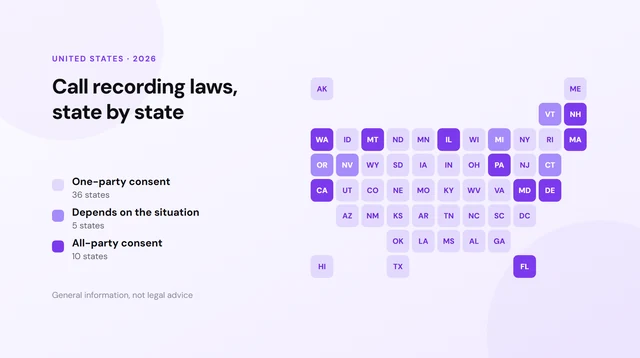
Cube’s own listing tells you to let the other person know they are being recorded, and that is good advice whatever the law says. In the US, the majority of states only need one participant’s permission, which can be your own; ten want every person on the line to consent, and a few more depend on the circumstances. What decides it is where each of you is sitting, and a sideloaded Helper or a cloud recorder makes no difference to that. Each state’s rule is listed in our guide to recording laws state by state. This is general information and not legal advice.
Sources: Cube ACR on Google Play · Cube ACR on the App Store · Cube ACR Helper installation guide · Cube ACR FAQ · Google Play accessibility policy · Epocra pricing. Listings, prices and guidance checked 13 October 2026. Cube ACR is a trademark of its owner and is named here for review only.
Frequently asked questions
On many Android phones, yes, but on Android 9 and later Cube says you need its Helper app, installed from outside Google Play, to identify callers, record the other person and record VoIP calls. Calls on a headset or Bluetooth still only record your side, according to Cube.
A companion app that switches on the Cube ACR app connector in your accessibility settings. Google Play no longer lets the main app ask for that permission, so Cube distributes the Helper through the Galaxy Store, AppGallery, Amazon Appstore, Aptoide and its own website. You need both apps installed.
Usually because the connector is off or the recording source does not suit your phone. Cube suggests turning on the App Connector, setting the source to voice recognition (software) with force in-communication mode, and switching off other recorders, voice assistants and WiFi calling. Headset calls cannot be fixed.
The main app is on Google Play with more than 50 million downloads. The Helper is installed from outside Google Play, so it has not been through Google review; if you use it, take it only from cubeacr.app or a store Cube names.
There is an iPhone version, but it works differently. You call a service number and merge it into your call, and your carrier must support three-way calling. It costs $7.99 a week, $34.99 for six months or $49.99 a year.
On Android, yes, on phones whose hardware allows VoIP recording. Cube says not every device can, and that this cannot be fixed in software.
Recording on the line avoids the problem. Epocra is a calling app whose own line records both sides of every call, so it needs no accessibility permission and works the same on any Android phone, iPhone or headset.
More in the Help Center: What gets recorded.
James Ritter
Founder of Epocra. Fifteen years in payments, now building call intelligence for people who run their business from their phone.
Keep reading