Finding a recorder that captures the call properly is the first problem. Google
closed the route most Android recording apps depended on in 2022, and Apple’s own
recorder announces itself to both parties and files the audio away in Notes. When you do
have a usable recording, sending it on is generally a manual step: open the app, find the
call in a list of timestamps, tap share, choose Mail, wait for the file to attach, send.
What lands in the inbox is an audio file named something like
REC_20260811_103217.m4a, with nothing on it to say who you spoke to or what
was agreed.
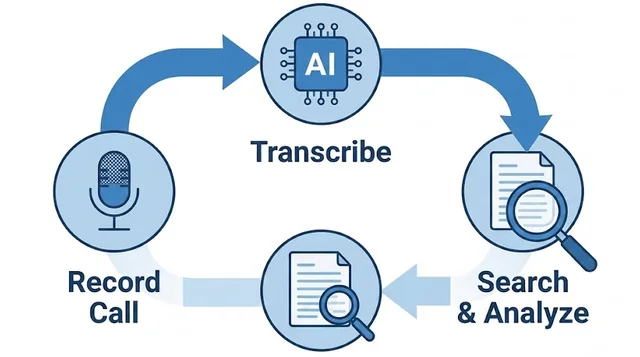
The recording is not the useful thing to receive. The record of it is. Epocra records every call on the line and emails you the write-up the moment the call ends — what was discussed, what each side committed to, and the follow-ups as dated items you can drop straight into a calendar. The audio and the full transcript sit one click away in the same email, and most days you will not need them, because the answer is already in the message.
See it in action
The write-up that sends itself
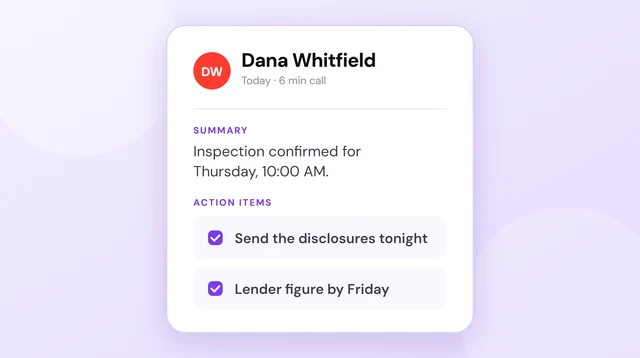
An interactive demo — not a video — of a call being recorded and written up. What you are looking at on the phone is what arrives in the inbox: the same summary, the same action items, the same follow-ups. The email is not a shorter version of the record, it is the record.
- Sent when the call ends — nothing to export, nothing to attach
- Readable in the inbox — summary, commitments and follow-ups, as text
- Audio and transcript one click away — for the rare occasion you need them
What should arrive
Before going through what the recorders actually do, it is worth being concrete about what you are aiming for. The useful email is the one you can act on without opening anything: the subject line names the other party and the reason for the call, and the body answers the three questions you have afterwards — what happened, what did I agree to, and what did they agree to.
Here is the shape of the message Epocra sends once a call ends. Nothing in it was typed by a person.
epocra Call Intelligence noreply@epocra.com
Dana Whitfield (Oak Street Supply) · Pricing & Delivery Window
Outgoing call 6 min 12 sec
Dana Whitfield
Oak Street Supply
James called Dana to confirm pricing on the spring order. Dana held the unit price but flagged that the delivery window had slipped by a week because of a supplier backlog. James asked whether a partial shipment was possible; Dana agreed to check stock and come back before Friday. They also touched on a credit application that has not been returned.
Action items
📋 MY ACTION ITEMS
→ Send the signed credit application back to Oak Street Supply. 📅 Add to Calendar
👤 DANA’S ACTION ITEMS
→ Check warehouse stock and confirm whether a partial shipment can go out before Friday.
Key takeaways
- Unit pricing is unchanged from the last order.
- Delivery has slipped roughly one week; a partial shipment may be possible.
- The credit application is still outstanding on our side.
Topics
Spring order pricing RESOLVED
Delivery window IN PROGRESS
Credit application NEEDS FOLLOW UP
Read full transcript
The difference is not cosmetic. A recording of that call is six minutes you would have to sit through. The version above is a paragraph and two tasks, and the thing most likely to cost you money — that the delivery date moved and somebody else owes you an answer by Friday — is written down with a name against it rather than buried four minutes into a recording.
The split is the part worth noticing. Follow-ups are separated into the ones you picked up and the ones the other person did, because those are two different lists with two different failure modes. Yours is a to-do. Theirs is something to chase when Friday comes and nothing has arrived.
What “send to email” actually means on a call recorder
Plenty of recorders list share via email among their features, and the phrase is doing a lot of work. It means the app can hand a file to your mail client. It does not usually mean anything arrives on its own.
In practice the sequence is much the same everywhere. The call ends. You open the recorder. You find the right entry in a list that identifies calls by timestamp. You tap share, pick Mail, wait while the file attaches, type an address, and send. It takes about a minute once you know which file you want. That is a fine way to pass on a single recording when something has gone wrong. It is a poor way to keep a record of thirty calls a day, which is the difference between a share button and a system.
It is worth knowing what the built-in options do here, because neither of them emails anything either. Apple’s recorder, added in iOS 18.1, saves the audio and its transcript into the Notes app and has no send step at all. It also plays a notice both parties hear, which is a problem of its own — see iPhone call recording without the announcement. On Android, Google closed the route third-party recorders depended on in 2022, so most of the apps still listed in the Play Store capture your side of the conversation or nothing at all; how to record calls on Android covers what survived. An app that cannot record the call properly cannot email it to you properly either.
Where the manual loop breaks
Three failure points, and they are not evenly distributed — each one hits hardest on exactly the calls you most wanted to keep.
The long calls are the ones that bounce
Recorded call audio commonly runs between half a megabyte and a megabyte per minute. A twenty-minute call is therefore somewhere around ten to twenty megabytes, and an hour-long call can reach fifty or sixty. Gmail rejects attachments over 25 MB and Outlook over 20 MB. The five-minute call sends fine. The hour-long negotiation does not.
The filename tells you nothing
An audio file named REC_20260811_103217.m4a sitting in your inbox six weeks
later is not a record of anything. You cannot tell from the subject line who was on the call
or whether it mattered, and you are not going to open a twenty-minute file to find out. A
message you will not open is not an archive; it is clutter with good intentions.
It depends on you remembering
The loop only runs if you run it, and the calls after which you would most value a permanent copy are the ones that leave you late for the next thing. The record ends up complete for the quiet weeks and full of holes through the busy ones, which is precisely backwards.
Why the audio file is the wrong thing to email
Step back from the mechanics and the deeper problem shows up: an inbox is a text medium you scan, and audio is a linear medium you have to sit through. Emailing yourself a recording converts something you could have searched in seconds into something you have to schedule time for.
A twenty-two minute call takes twenty-two minutes to review and cannot be skimmed. To check a single number or confirm one sentence, you scrub back and forth guessing at where it was. So the file arrives, and it sits there, and the folder grows, and none of it is ever opened again.
When did you last go back and listen to a call recording you had emailed to yourself? For almost everyone the answer is never — which means the thing being carefully archived is not actually the thing anyone wanted. What people want is to know what was said, and audio is the least convenient possible container for that.
Getting a recorder to email you
If you are committed to receiving the audio itself, there is a workable version. Use a recorder that syncs finished files to cloud storage, then add an automation — Shortcuts on iOS, Tasker on Android, or a rule in the storage service — that mails the file whenever a new recording appears. It works, and it inherits every limit above: the long calls still exceed the attachment ceiling, and the filenames are still timestamps.
One thing worth separating out, because the search results confuse them constantly: getting your voicemail delivered to an inbox is a different and much older feature. Carriers have offered it for years, and it covers messages people leave when you do not pick up. Voicemail to email covers who actually offers that and what arrives when they do; voicemail to text covers how those messages become readable. Neither has anything to say about conversations you actually had.
The direct version is a service that records on the line rather than on the handset, so there is no file on your phone to export in the first place. On Epocra the write-up is sent to the address on the account as soon as the call finishes processing, it is a single toggle in Settings, and it applies to every call — inbound, outbound, and the ones you would never have remembered to export.
What the email leaves out, and why
Being precise about this matters more than the marketing would prefer.
The email does not attach the recording. That is a deliberate choice, not a missing feature. Attachments fail at exactly the length where calls start to matter, mail providers compress and re-encode audio unpredictably, and a mailbox is a poor place to keep the only copy of anything. The recording and the full transcript stay in your account and travel in the email as a link, which is subject to none of that.
It is a snapshot of the call as processed. The summary is generated once, when the call is analyzed. It is a written record of that conversation, not a live document.
It is not a substitute for the transcript. A summary is a summary. When the exact wording is the point — a figure, a date, a commitment somebody later disputes — the link at the bottom is there for a reason, and what it opens is a word-for-word call transcription with timestamps.
Stop emailing yourself audio files
Epocra records every call, writes it up, and sends the summary and follow-ups to your inbox automatically — with the recording one click away.
Start free trialFrequently asked questions
Some do, but it is not yet the norm. Most phone-based recorders save the file to the handset and offer a manual share option, which means opening the app and attaching the file yourself after every call. Automatic delivery generally needs either a cloud-sync recorder paired with an automation rule, or a service that records on the line and sends the write-up itself.
Commonly between half a megabyte and a megabyte per minute, so a twenty-minute call is roughly ten to twenty megabytes and an hour-long call can reach fifty or sixty. Gmail rejects attachments above 25 MB and Outlook above 20 MB, so the longest and usually most important calls are the ones that fail to send.
No, and that is deliberate. The email contains the summary, the action items for each side, the key takeaways, the topics and calendar links for anything with a date. The recording and the word-for-word transcript stay in your account and are reached from a link in the same email, which avoids attachment size limits and mail-server re-encoding.
The email includes a written summary of the conversation and links to the full transcript. That combination is more useful in an inbox than either the raw audio or a wall of unformatted text, because the summary is readable in the notification and the transcript is one tap away when the exact wording matters.
No. Voicemail to email delivers messages people leave when you do not answer, and carriers have offered it for years. It says nothing about calls you actually took. Recording and summarizing a live conversation is a separate capability.
Yes. Email summaries are a per-account setting and can be switched off without affecting recording, transcription or anything else, so the record still exists in the app whether or not a message is sent.
More in the Help Center: Exporting and sharing.
James Ritter
Founder of Epocra. Fifteen years in payments, now building call intelligence for people who run their business from their phone.
Sources: Apple Support — Record and transcribe a call · MacRumors · Tom's Guide. Device support and regional availability verified July 2026.
Keep reading