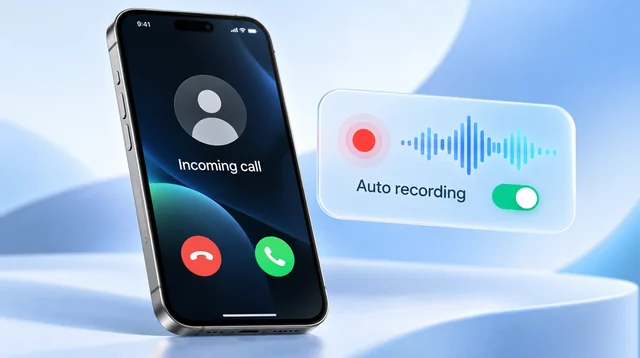
If you have a recent iPhone or Pixel, you already have free call transcription. The iPhone (15 Pro and later) and the Pixel (9 and later) both turn a call into a transcript and summary, but you start them by hand on each call and both announce the recording to everyone. Only apps that carry the call on their own line can transcribe every call without you pressing anything.
- An occasional call, recent iPhone or Pixel: use what is built in. It is free.
- A separate number with AI notes: Google Voice Standard, $20 a month.
- Meetings and calls with one gadget: a clip-on recorder, Plaud or Pocket.
- Every call, incoming and outgoing, on your own number: Epocra.
Use an app that carries the call. Epocra records both sides of every call on its own line from the moment it connects, on your existing number, and writes the transcript, a summary and the follow-ups when you hang up.
Disclosure: we make Epocra. Facts about the other products come from their own help pages, listings and pricing, checked in October 2026.
See it in action
Every call, transcribed
An interactive demo, not a video. A call ends, and a few minutes later the transcript and summary are waiting, with nothing pressed during the call.
- Automatic: every incoming and outgoing call
- Transcript by speaker: plus a summary and the follow-ups
- Your own number: through one call-forwarding code
All seven side by side
| Option | Automatic? | Price | The catch |
|---|---|---|---|
 iPhone iPhone | No, tap each call | Free | Transcript needs iPhone 15 Pro or later; announces to both |
 Pixel Call Notes Pixel Call Notes | No, start each call | Free | Pixel 9 or later, five countries; announces to both |
 Google Voice Google Voice | No, tap Notes each call | $20 a month for AI notes | A separate number; free plan has no transcript |
 Epocra Epocra | Yes, every call | Free trial, then $24.99 a month | You call from the Epocra app |
 TapeACall TapeACall | Outgoing only | $7.99 a week (~$35 a month) | Needs carrier three-way calling |
 Plaud Plaud | No, press record | $159 or $189; 300 free minutes a month | No earbuds or headsets |
 Pocket Pocket | No, press the button | $129; unlimited free transcription | No earbuds or headsets |
On a phone, swipe the table sideways.
Already on your phone
iPhone. Since iOS 18.1 you can tap More during a call and choose Call
Recording. The recording lands in the Notes app, and on an Apple Intelligence iPhone (15 Pro
and later) you can tap Show Transcript and Summary. Older iPhones record but never
transcribe. Both people hear an announcement, and there is no setting to turn it off. More in
how to record a phone call on
iPhone.
Pixel. Call Notes, on the Pixel 9 and later, transcribes the call on the
phone with Gemini and writes a short summary. It is not on the A series, works in five
countries, and tells everyone on the call when it starts. More in
call notes.
Both are free and both work well. The limits are the hardware, the announcement, and remembering to start them.
Apps that carry the call
These do not try to listen to your phone. The call itself runs through them, which is why they can transcribe both sides cleanly.
- Google Voice: free Voice records incoming calls when you press 4, as
audio only. Voice Standard, $20 a month, adds Gemini notes when you tap Notes on a call.
Automatic recording is only on the team plan. Details in
does Google Voice record calls.
- Epocra: calls you make in the app go out over its line, and calls to
your normal number reach it through one carrier code. Every call is recorded and
transcribed automatically, with a summary and tasks. A recording notice plays by default
and can be turned off where the law allows. Free trial, then $24.99 a month.
Recorder app: TapeACall
TapeACall merges a recording line into your call as a three-way call, then transcribes
it. Outgoing calls can be recorded automatically; incoming ones need a manual merge, and your
carrier must support three-way calling. It costs $7.99 a week, about $35 a month. See
Epocra vs TapeACall.
Clip-on devices
These attach to the back of the phone and pick up the call through vibration, then transcribe it in their own apps. You start each recording yourself, and neither hears the other person when you take the call on earbuds or a headset.
Plaud. The Plaud Note ($159) and Note Pro ($189) record calls; the
Note Pro switches into call mode by itself. The free plan includes 300 minutes of
transcription a month, and Plaud Pro is $99.99 a year for 1,200 minutes a month. More in
how Plaud records phone calls.
Pocket. One card-sized device, $129, with a switch for call mode. The
free plan includes unlimited standard-accuracy transcription, and Pocket Pro is $19.99 a
month. More in can Pocket record phone
calls.
The two side by side are in Plaud vs Pocket.
The rest, and why we left them out
 Granola transcribes only the calls you place from its iPhone app; no
incoming calls and nothing on Android. More
on Granola.
Granola transcribes only the calls you place from its iPhone app; no
incoming calls and nothing on Android. More
on Granola. Cube ACR records calls on Android, but its listing does not mention
transcription there, and on iPhone it works like TapeACall.
Cube ACR review.
Cube ACR records calls on Android, but its listing does not mention
transcription there, and on iPhone it works like TapeACall.
Cube ACR review. Otter cannot record a phone call; its help center says calls must be
recorded separately and imported.
Otter cannot record a phone call; its help center says calls must be
recorded separately and imported. Fireflies only gets a call that runs through your computer or a
business phone system.
Fireflies only gets a call that runs through your computer or a
business phone system. Rev shut down its call recorder app in 2025. It still transcribes a
recording you upload, but you have to record the call some other way first.
Rev shut down its call recorder app in 2025. It still transcribes a
recording you upload, but you have to record the call some other way first.
What each one gives you after the call
| Option | Transcript | Summary and tasks | What you can do next |
|---|---|---|---|
| iPhone | By speaker, in the Notes app | Summary on Apple Intelligence iPhones | Search and share it like any note |
| Pixel Call Notes | Yes, made on the phone | Short summary | Read it in the Phone app |
| Google Voice | Yes, with the recording | Key points and action items | Open in the Voice app or from the email link |
| Epocra | By speaker, both sides on separate tracks | Summary, plus follow-ups as tasks | Ask questions across every call; each contact builds a profile from your calls |
| TapeACall | Yes | Not offered | Share by email or text, or to Dropbox, Evernote or Google Drive |
| Plaud | Yes; names only your own voice | Summary | In the Plaud app |
| Pocket | With speaker labels | Summary, action items, mind maps | Chat with your recordings; integrations on Pro |
On a phone, swipe the table sideways.
What to do with a transcript
- Settle who said what. A price, a date or a promise, word for word, with the time it was said.
- Turn promises into tasks. Copy the follow-ups into your to-do list or CRM, or use a tool that does it for you.
- Find it months later. Search for a name or a number instead of trying to remember which call it was.
- Share it. Send the summary to a colleague, or to yourself, instead of retyping your notes.
- Ask questions across calls. Some tools let you ask “what did the client say about the budget?” and answer from every call, not just one.
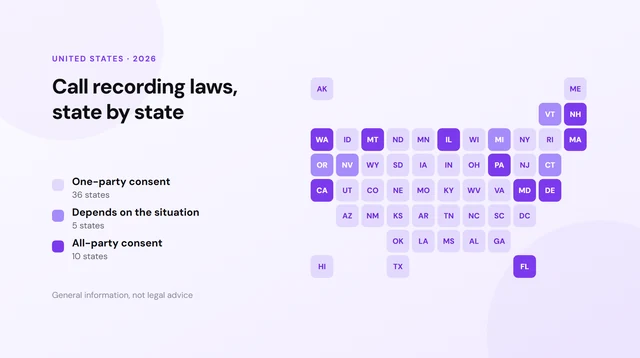
Whatever you choose, the consent rules depend on where you and the other person are; they are listed in call recording laws by state.
Sources: each product’s own help pages, App Store and Google Play listings and pricing pages, as linked from the individual reviews above, checked in October 2026. Epocra pricing. All product names are trademarks of their owners.
Frequently asked questions
It depends on your phone and how many calls you need. A recent iPhone or Pixel can transcribe calls for free if you start each one. To transcribe every call automatically on your own number, you need an app that carries the call, such as Epocra.
Yes, on an Apple Intelligence iPhone (15 Pro or later) in a supported language. Record the call from the Phone app, then open it in Notes and tap Show Transcript and Summary.
Yes. The iPhone and Pixel Call Notes are free on supported models, and Pocket includes unlimited standard transcription with the device.
Only apps that carry the call on their own line. Epocra does it for every incoming and outgoing call; Google Voice does it only on its Premier team plan.
Phones do not let apps listen to regular calls. Otter records what a microphone hears or joins online meetings, so a phone call has to be recorded elsewhere and imported.
The iPhone, Pixel, Google Voice and Epocra (by default) play a notice. TapeACall, Plaud and Pocket do not document one, so consent is up to you.
More in the Help Center: What gets recorded.
James Ritter
Founder of Epocra. Fifteen years in payments, now building call intelligence for people who run their business from their phone.
Keep reading